Everyone tells you to personalize. Write a warm note. Show you did your research. It sounds like the right move. But the biggest study on LinkedIn connection requests, covering over 96,000 invites, reveals the opposite: blank invites are accepted up to 68% of the time. Personalized notes? They drop to 45% or worse. The best LinkedIn message to connect might be no message at all. Here is why the data says silence works, and when you should break it.
The best LinkedIn message to connect might be no message at all
What 96,000+ connection requests reveal about acceptance rates
Here’s what the numbers tell us: sending a LinkedIn invite without a message works best.
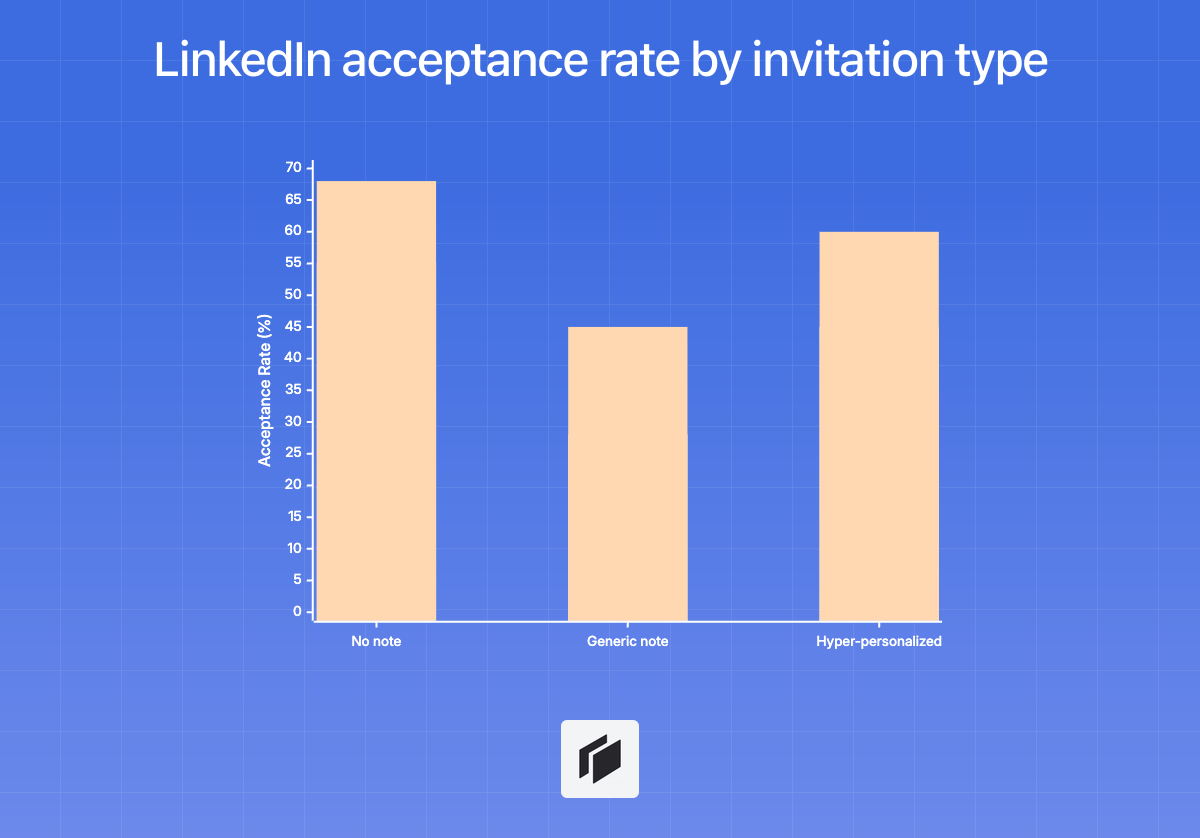
The ReactIn study looked at over 80,000 requests and found blank invites were accepted between 55% and 68% of the time.
If you add a generic message, acceptance drops to 28%–45%.
Even when you go the extra mile and mention something ultra-specific, like a post or a talk, the results aren’t much better, topping out around 45%–60%. Blank wins more often.
Botdog’s research backs this up.
Out of 16,492 invites, those sent without any notes landed higher acceptance rates 66% of the time.
And the so-called “personalized note,” which many believe is the secret to connecting, actually scored lower in 34% of cases.
Most people simply hit Accept faster when you don’t give them extra text to analyze.
Why blank invites outperform personalized messages
| Invitation Type | Acceptance Rate (ReactIn, 80K+ requests) |
|---|---|
| No note | 55–68% |
| With generic note | 28–45% |
| With hyper-personalized | 45–60% |
Botdog’s review matches this pattern.
Invites with no added note are usually twice as likely to be accepted compared to those with one.
This flips the old advice on its head.
It’s not about finding the right words or showing you’ve read a recent post.
Your best shot at connecting is often to leave the note box blank.
The psychology behind low-friction connection requests
Blank invites succeed because people prefer simplicity.
- Cognitive load: Accepting a blank invite is effortless. There’s nothing to judge, no reply to draft, no pressure.
- Skepticism: Even well-meaning notes trigger suspicion. Folks are wary of automations and mass templates. Unless there’s obvious shared context, many assume a pitch is coming.
- Evolved social norms: The invite is seen as a handshake, not a pitch. On LinkedIn, connecting comes first. Conversation happens later.
- The effort paradox: Messages are so tied to sales automation now that adding one feels desperate. Blank requests signal a low-pressure, peer-level approach.
A message-free request also removes any hesitation.
There’s nothing for the recipient to overthink or second-guess.
The real conversation happens once you’re in their network, assuming your profile looks credible.
Bottom line: the data points to one thing, no message gives you the edge.
What actually moves the needle: your profile, not your pitch
Your profile does the selling before anyone reads your note
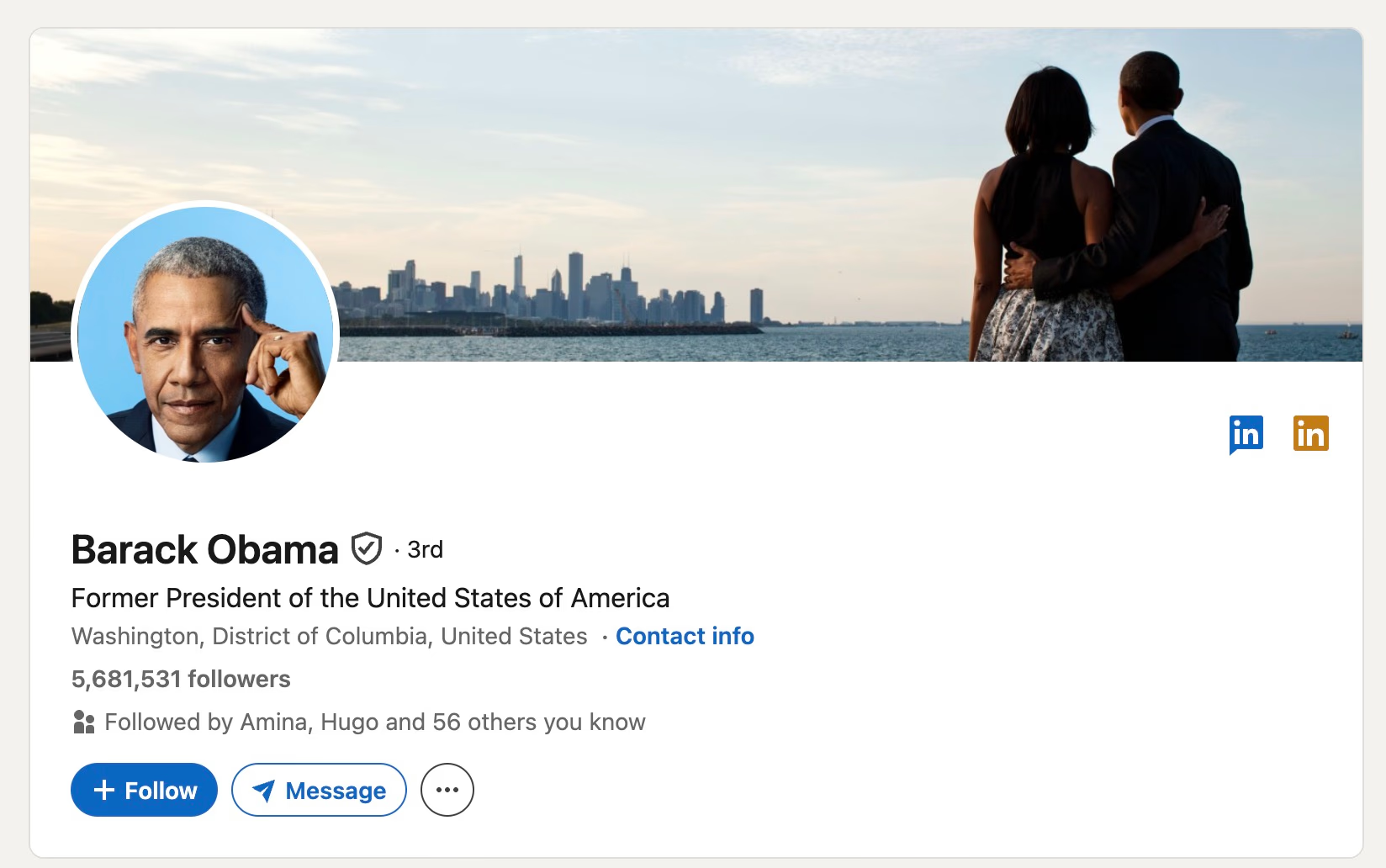
On LinkedIn, people make up their minds fast. They scan your profile and decide whether to accept or ignore your request long before they read your message.
Your profile is doing most of the work: a professional photo, a sharp banner, and a headline that spells out your value make the first impression. Messages play a distant second. Your profile is the filter.
The evidence:
- Profiles with professional photos get 21x more views and 36x more messages.
- High-contrast banners boost view duration by 23%.
- Clear, well-written About sections result in 3.9x more profile views.
If your acceptance rate is lagging, changing your outreach message almost never solves it. Audit your profile first. Make sure you look credible, not like another bot.
Headlines that create curiosity and authority
Your headline is your most important bit of copy. It shows up everywhere: search results, DMs, and invites.
Swapping a generic title, like “Founder at Company,” for a [Role + Value + Outcome] format can raise profile views by up to 40%.
What works:
- Your headline should clarify what you do, not just your rank.
- Spell out who you help and why.
- Add a concrete result or proof point, numbers help most.
Examples:
- ❌ “Marketing Manager at Company X”
- ✅ “Helping B2B SaaS companies close 40% more deals | Sales Director at TechCorp”
Skip vague phrases like “passionate leader” or “10+ years experience.” They don’t spark curiosity.
Why looking salesy kills your acceptance rate
There’s a sharp divide between authority and being a pitch machine. Profiles start to look salesy when they rely on tired buzzwords, lack genuine activity, or push aggressive calls to action.
Data shows acceptance rates drop when your profile reads like a cold pitch. Avoid this by:
- Sticking to specific, low-pressure outcomes.
- Dropping all-caps text and emoji overload.
- Removing “open to work” signs if you want outbound authority, they make you look less proactive.
The acceptance rate benchmark: 20–50%
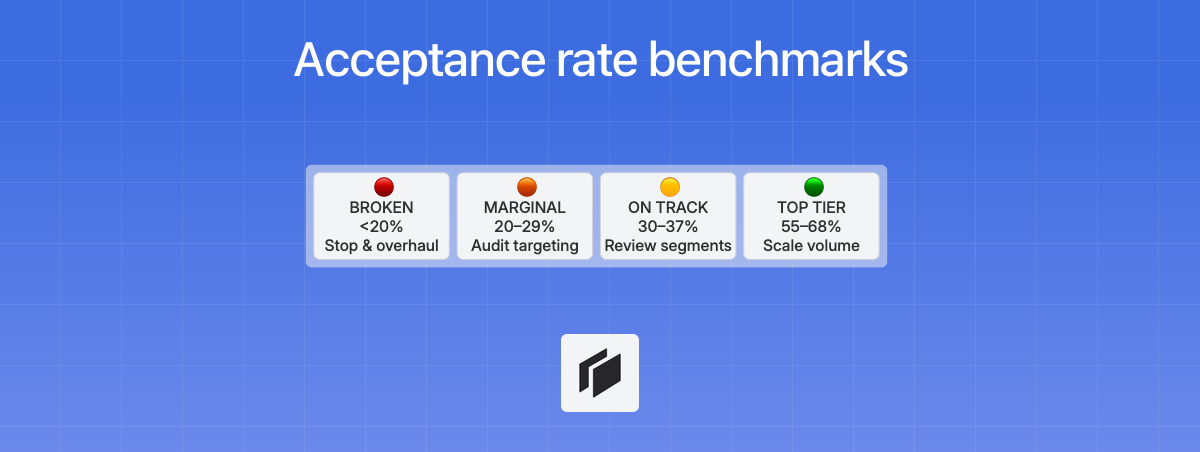
Dialing in your profile is your best move. Here’s what to aim for:
- Baseline: Average B2B acceptance in 2026 is 30–37%.
- Target: With no invite message, rates should land between 55–68%.
- Red flag: Under 20% means your targeting or your profile needs work, not your note.
Before you rewrite any scripts, make sure your LinkedIn is complete, active, and nails credibility in under six seconds. If your profile delivers value up front, connection invites usually fall into place.
When the connection message actually matters
Shared context and recent interactions
Let’s say you were both at a recent meetup, collaborated on a project, or exchanged thoughts in a niche online group. That gives you immediate common ground.
Mentioning a specific talk or a useful comment they made on LinkedIn makes your approach feel warm, not cold. These micro-details cut the friction and can push acceptance rates into the 45–60% range. So it’s worth skipping the blank invite for this.
Just keep your note under 200 characters, and skip any sales pitch.
High-value prospects
If you’re targeting senior leaders or dream partners, a personalized note is non-negotiable. It’s your insurance against getting flagged as spam.
The key is personalization that actually reflects real research, like referencing a recent interview or insight. High-value prospects spot bulk automation instantly, so your note needs to be specific and brief if you want their attention.
Immediate context or upcoming events
Sometimes, you don’t need to do deep research to be relevant. Mentioning a specific context—like an upcoming industry conference or a mutual professional milestone—works because it establishes a clear “why” for the connection. In these cases, you don’t even need to personalize the note for each individual; as long as the context is shared, the message feels intentional.
Example:
“Hi [Name], I see you’re also attending the Web Summit next week. Would be great to connect here before the event starts!”
Using Cockpit for targeted personalization
For the rare leads where real precision matters — high-value prospects, event attendees, or recent posters — Cockpit lets your team scale personalization without losing context. Here’s how it works in four steps.
Step 1: Import prospects into the grid
Start by bringing your leads into Cockpit’s spreadsheet. Import from LinkedIn Sales Navigator search results, a CSV export, or even a list of post engagers. Each prospect becomes a row, ready for enrichment.
Step 2: Enrich with LinkedIn context
Run enrichment columns to pull in data from 26+ sources. For each prospect, Cockpit can retrieve their recent LinkedIn posts, bio summary, shared group memberships, and company news. This is the raw material your personalized note needs.
Step 3: AI generates personalized connection notes
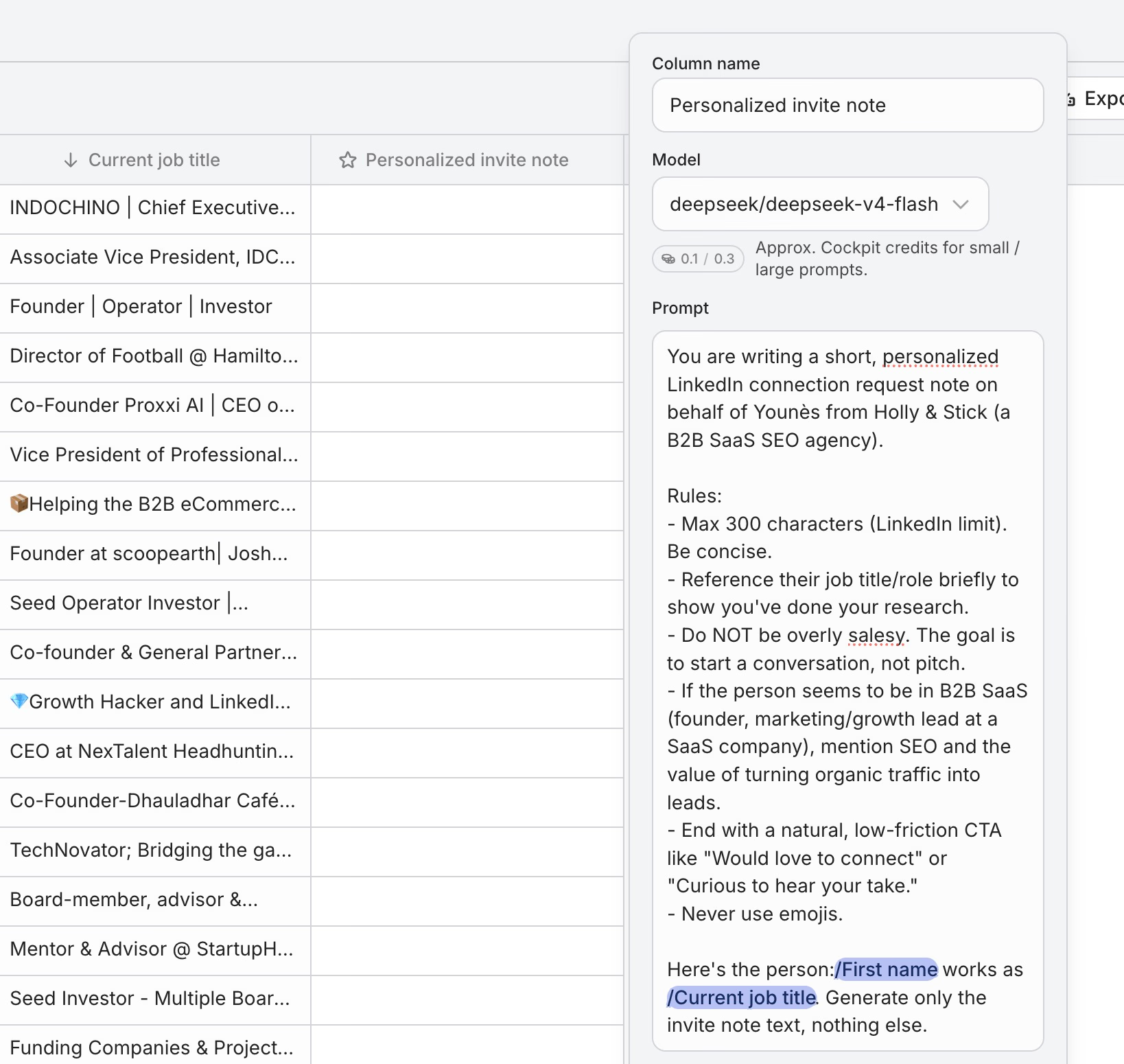
Set up an AI column that takes the enriched data and outputs a short, human-sounding connection message. For example, if a prospect recently posted about hiring, Cockpit’s AI can generate:
“Congrats on the team expansion! Would love to connect and follow your journey.”
If you share a mutual group, it writes:
“Saw we’re both in the B2B SaaS Founders group — happy to connect here!”
No manual research, no copy-pasting. The AI handles the personalization at scale.
Step 4: Review, segment, and execute
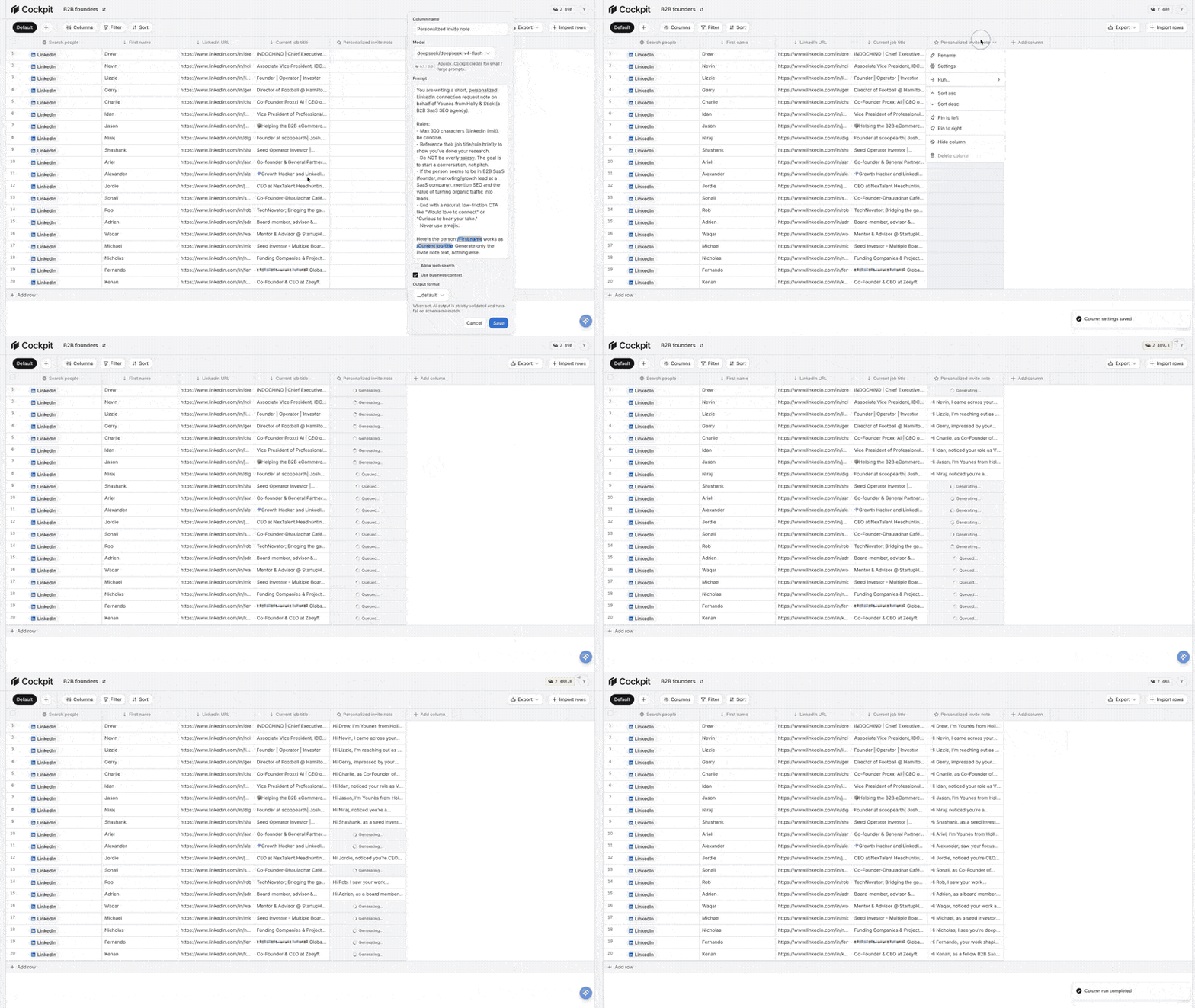
Sort your grid. Prospects with strong, verifiable context get personalized notes. Everyone else gets a blank invite. You can filter, export, or trigger your outreach directly — all from one view.
Volume plus personalization where it actually helps conversion. That’s the Cockpit advantage.
Connection message templates that actually work
Three templates worth using
You don’t need a script for most of your outreach.
But when you do add a note, keep it under 200 characters, make it specific, and skip the pitch altogether.
Super-personalized notes can hit acceptance rates around 45–60%, almost as strong as sending nothing at all.
1. Shared event or talk
”Hi [Name], caught your session at SaaStock; your framework on churn stood out. Would love to connect.”
Why it works: Calling out a specific moment proves your message is genuine, not another mass send.
2. Mutual group reference
”Saw we’re both in the B2B Growth Ops group. Your comment yesterday was spot on, happy to connect here.”
Why it works: Sharing a group lowers skepticism and signals real interest.
3. Recent post engagement
”Your post on product-led onboarding simplified a messy topic. Thanks for sharing, would be great to connect.”
Why it works: Highlighting their content shows you’ve paid attention, and didn’t just scrape their profile.
If there’s no obvious, verifiable context, skip the note.
Cockpit can handle this automatically, scaling granular notes only when there’s real, specific common ground.
Why most template advice misses the point
Most “growth hacks” recycle the same format: “Hi [Name], I help companies do X. Let’s connect!”
The numbers don’t lie, these generic pitches drag acceptance rates down to 28–45%.
Templates with zero shared context just raise red flags.
Since 2025, social norms have shifted: a note is only expected if you’ve had a clear, recent interaction.
If not, your message reads like spray-and-pray automation.
What to avoid in every request
You’ll tank your acceptance rate if you do any of the following:
- Pitching in the invite: Even a whiff of sales talk kills your odds.
- Over-long messages: Anything past 200 characters is spam.
- Buzzwords: Jargon like “synergy” or “value-driven” screams recruiter.
- Fake personalization: Tossing in a job title or city without any real connection is worse than no note.
- Overexplaining: Don’t justify why you want to connect; let the shared experience do it for you.
Best practice: If you can’t reference a recent, real overlap, don’t send a note.
Let your headline and mutuals carry the rest.
Cockpit makes it easy to stick to this strategy: automate blank invites for about 70% of your list and save hyper-personalized notes for the top 30%, where shared context is actually real.
Key takeaway: Most connection scripts do more harm than good. Only send a note when you have something fresh and specific to reference.
This targeted approach, powered by Cockpit’s automation, puts your effort where it actually pays off.
Timing and targeting strategies for higher acceptance rates
Best days and times to send connection requests
Most users act fast, about 63% respond within 24 hours. You need to reach them while they’re active, or your request sits there and gets stale.
Optimal windows, recipient’s local time:
- Days: Tuesday and Wednesday
- Times: 9–11 AM or 2–4 PM
These windows sidestep the Monday email rush and Friday’s end-of-week distractions. Mid-morning and post-lunch see activity spikes, so that’s when users tend to check notifications.
Weekend requests typically gather dust or expire. That drags your acceptance rate down.
Targeting active users with Sales Navigator
You lose momentum when you target dormant accounts. The best approach is to focus only on users showing recent activity.
With Sales Navigator, filter for:
- Posted on LinkedIn in the past 30 days
- Changed jobs in the past 90 days
- Mentioned in the news in the last 30 days
By only targeting these signs of activity, you reach people who are actually showing up. Teams using these filters consistently hit high benchmarks, with acceptance rates in the 30–37% range. Rates below 20% usually mean poor targeting, not poor messaging.
Cockpit streamlines this for you. Pull leads via API, enrich your grid with activity markers, and sequence outreach only to those who have posted or moved jobs recently.
The 7-day withdrawal strategy
Since almost 90% of connections are accepted within a week, leaving old pending invites sitting around is a waste. They’re unlikely to convert, and they clog up your slots. Worse, a backlog of ignored invites tells LinkedIn you might be spamming, which can put your account at risk.
The strategy:
- Review your pending requests weekly.
- Withdraw any invite older than 7 days.
This keeps your account in good standing and lets you reuse those slots for new, active prospects. In Cockpit, you can track every send date, quickly sort for any invite pending beyond a week, and bulk-withdraw to keep your pipeline clean.
Precise operations, targeting active users at peak hours and keeping your pending queue lean, are what actually scale high-performing outbound efforts.
Your LinkedIn connection strategy: 70% blank, 30% personalized
Numbers don’t lie. Blank LinkedIn invites get accepted more often than invites with a message. Out of more than 96,000 requests, no-note invitations saw a 55 to 68% acceptance rate. Generic messages dropped acceptance to just 28 to 45%.
So your baseline should be simple: send a blank invite unless you have genuine, strong shared context.
With real context, personalized messages can hit 45 to 60%. Otherwise, skip them. The best balance is a 70/30 split. Use blank invites for broader outreach, and ultra-personalized notes only for leads you truly care about.
Benchmarks and warning signs
In 2026, B2B acceptance rates average between 30 and 37%. If yours falls below 20%, something is off.
A low rate can mark your profile as spam in LinkedIn’s algorithm, and it can also get your weekly invite limit slashed.
Acceptance rate performance:
| Acceptance rate | Status | Action |
|---|---|---|
| 55–68% (no note) | Top tier | Scale volume |
| 30–37% (B2B average) | On track | Review segments for optimization |
| 20–29% | Marginal | Audit targeting and profile |
| <20% | Broken | Stop and overhaul approach |
If you’re below 20%, don’t just keep pushing volume.
Fix your targeting and build up your profile credibility first.
Scaling personalized outreach with Cockpit
Personalization works, but only when it’s based on something real, like a shared group or someone’s recent post.
Scaling this without drowning in manual research means you need enriched data and automation.
Cockpit makes it manageable for small teams to run a 70/30 split.
- Contextual import: Bring prospects straight from LinkedIn searches or post engagement into a workflow grid.
- Automated enrichment: Add columns for recent posts, mutual groups, or company news.
- Strategic segmentation: Filter your list so that 70% get blank invites. Flag the other 30% for personalized notes where you have clear context.
- AI-driven personalization: Use AI to craft one-line notes referencing a recent post or a mutual group.
- Iterative tracking: Monitor acceptance rates by segment and immediately drop any templates or approaches that flop.
Example workflow:
- Import 500 leads with current activity data.
- Filter out 350 leads with no obvious shared context, then send blank invites.
- For the other 150, have AI generate a short note tied to their recent activity.
- After seven days, withdraw any requests that weren’t accepted.
This turns outbound into a repeatable process. It also keeps your manual effort focused on the leads that matter, rather than endless research.
Let your numbers decide the approach. Default to blank invites unless there is a solid reason to personalize. Save hyper-personalization for moments when real context is there.
Stop overthinking your pitch. Start optimizing your strategy.
The data is clear. Most of the time, the best LinkedIn message to connect is nothing at all. Blank invites hit 55 to 68% acceptance. Personalized notes only match that when you have real, verifiable context.
Your profile does the heavy lifting. Your headline, your photo, and your activity matter far more than any message. Spend your energy there first.
Follow the 70/30 rule: send blank invites for 70% of your outreach. Save personalized notes for the 30% where you share a real connection, a recent post, a mutual group, or an upcoming event. Use tools like Cockpit to scale that precision without the manual grind.
Stop asking what to write. Start asking who to target and when to connect. The numbers will tell you if you got it right.