

300 cold emails. Zero replies.
That’s what a typical outbound rep sends in a week when they’re running a generic sequence. Not because they’re bad at sales. Because their emails could have been written for anyone.
In 2026, inboxes are smarter, buyers are more skeptical, and the gap between a forgettable email and one that gets a reply comes down to a single thing: does this message feel like it was written specifically for me?
How to write cold emails that get responses
Most cold emails flop because they’re too generic.
When a message lands in someone’s inbox and could be meant for anyone, it gets ignored.
The best outreach feels handcrafted for the person reading it, making it simple for them to respond.
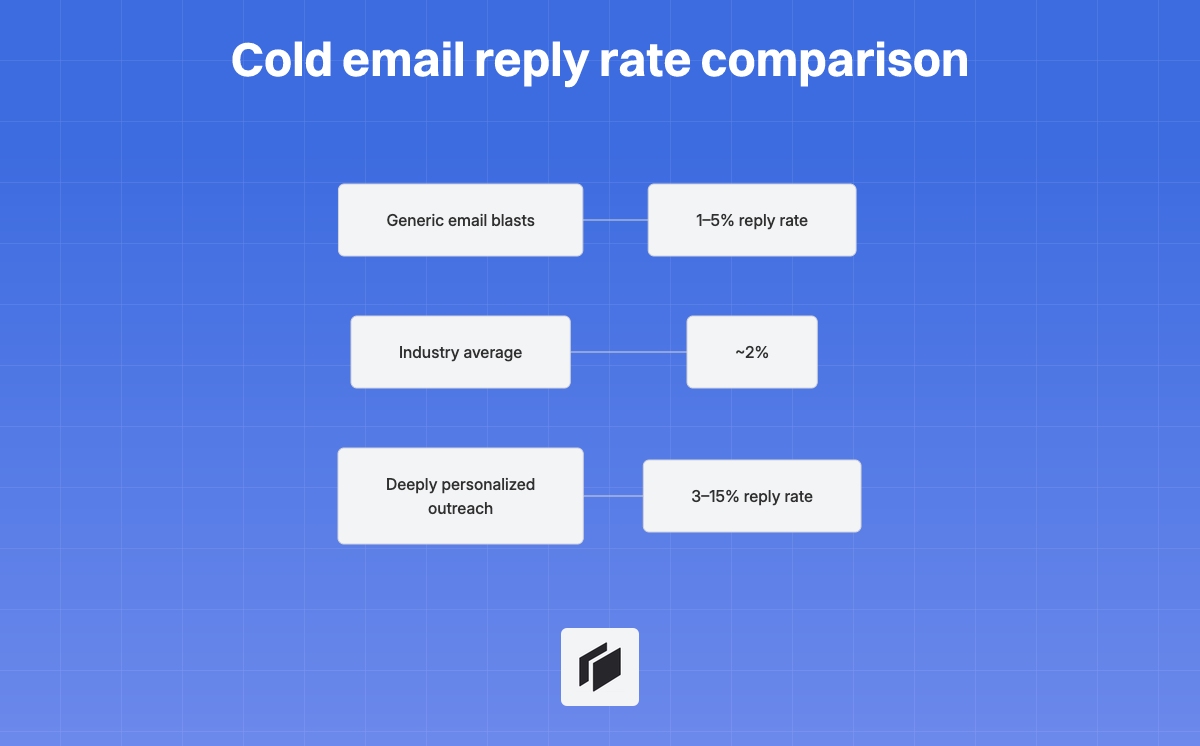
If you double down on deep personalization, you can boost reply rates up to 3-15%, much better than the usual 1-5% hit rate from generic email blasts.
To break through the noise, make every sentence matter for the reader.
Start with something relevant to them, tie what you noticed to their actual challenges, and keep your ask quick and painless.
Skip phrases like “just checking in,” and don’t ask for 30 minutes on the first contact.
Here’s what that looks like:
- Generic: “I hope this finds you well, I wanted to reach out about our best-in-class solution.”
- Effective: “Noticed your team just launched the new supplier dashboard. Usually that means a spike in customer queries. Curious if you’re handling those internally?”
A personalized opener only works when it connects to their business.
A personalized opener that doesn’t relate to their business is just polite, not meaningful.
You need to show you understand their world and can actually help.
Next, we’ll get into how to structure cold emails, personalize at scale, use templates that work, and build a follow-up routine.
Use these to turn your outreach from ignored to answered.
What makes a cold email work in 2026
Just dropping someone’s first name into a subject line won’t bump your open rates anymore. People are blind to it. “John, quick question” is a flashing sign for automation ahead.
Inbox fatigue is real. There’s endless “leveraging synergies” and “I noticed your profile”. People recognize these canned lines within seconds.
Personalization: What actually works
Good personalization isn’t decorative. It is actionable, and it moves the conversation toward something relevant. For example:
- Bring up their recent funding round, a noticeable change in their tech stack, or a hiring streak.
- Reference a specific LinkedIn post or a podcast they appeared on.
- Connect your message to pain points common in their specific role.
There are really only two approaches left: hyper-personalize every email through deep lead enrichment, or build ultra-targeted lists so a single precise message fits everyone in the batch.
The anatomy of a cold email that gets responses
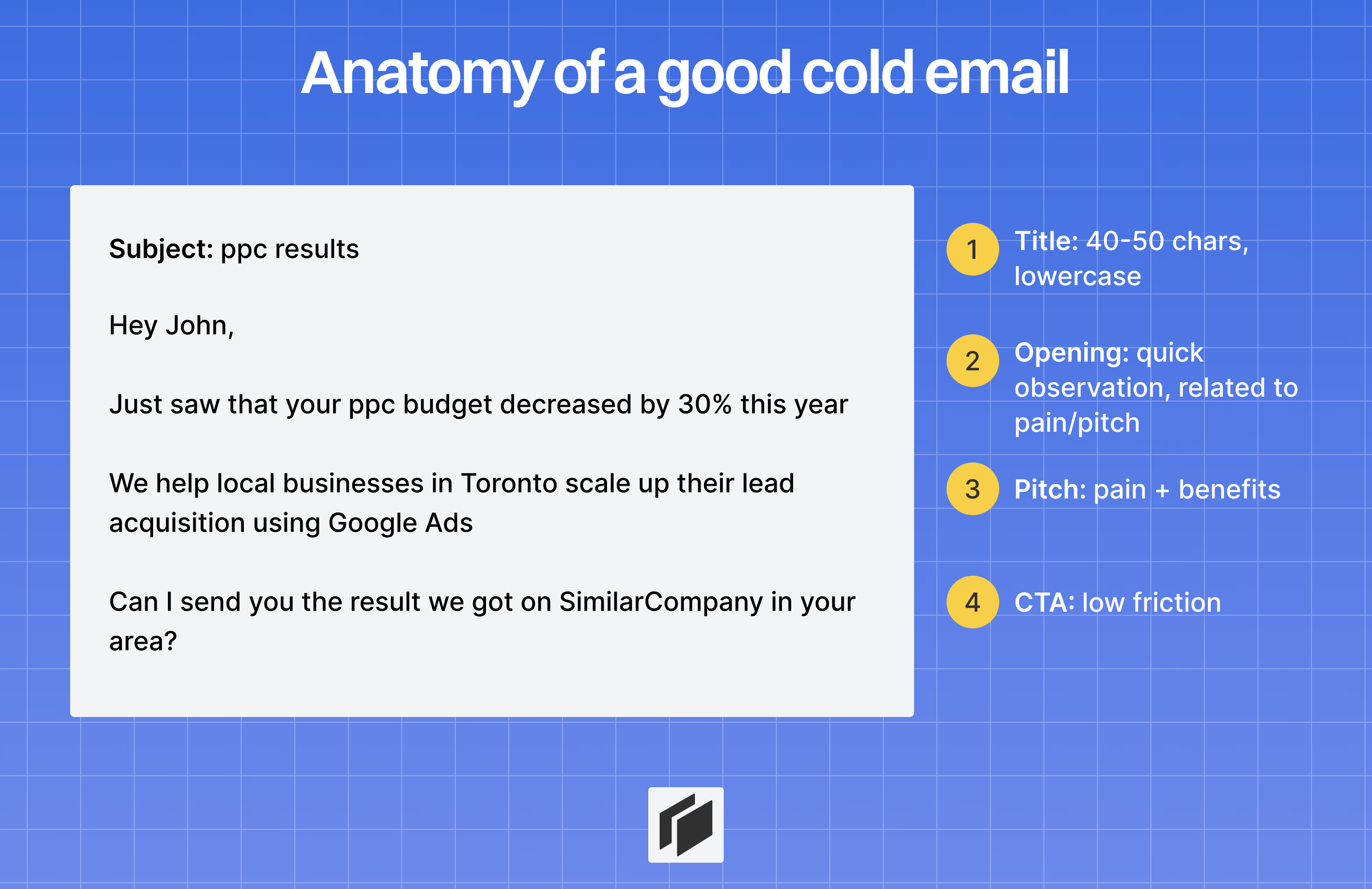
Subject line: intrigue without hype
The subject line has a simple job: get your email opened.
Stick to 40 to 50 characters, use lowercase, and skip extra punctuation. Lowercase subject lines usually work better because they look like internal notes, not marketing blasts.
Stay away from hype like “Increase revenue 10x.” Instead, go for specific, neutral phrases, such as “quick question about [company]’s outbound” or “saw [company]’s Series A.”
If your subject line could apply to anyone, it will get ignored.
Opening line: lead with an observation
Your first 8 to 12 words need to prove you are not sending mass emails.
Start with something concrete you have noticed, and explain why it stood out.
- Effective: “Noticed [company] is hiring 3 AEs, figured your outbound is ramping.”
- Generic: “I hope this email finds you well.”
If you could swap the recipient’s name and details and the opener still makes sense, it is not personalized enough. Make sure your observation leads naturally into your pitch so it does not feel forced.
The pitch: one benefit tied to their problem
Keep your pitch to two or three sentences.
Highlight one clear benefit tied to a specific pain point. Use frameworks like PAS (Problem, Agitate, Solution) or AIDA (Attention, Interest, Desire, Action) to organize your thoughts.
Skip the feature dump and focus on results: “We helped [Company] move from 2% to 12% reply rates in six weeks.” Connect your solution directly to the observation in your opener.
The CTA: single, low-friction ask
Finish with a simple, low-barrier call to action (CTA).
In your first email, do not ask for a 30-minute meeting. Interest-based CTAs almost always beat high-commitment requests.
- Low friction: “Worth 15 minutes?” or “Curious if this is relevant?”
- High friction: “Let’s book a demo and sit down for an hour next Tuesday.”
A strong CTA makes it easy to say yes. One goal per email means no multiple links or asks.
Length and format: short and mobile-first
Aim for 50 to 125 words.
Assume the recipient is reading on their phone. Use short sentences and plenty of white space. Make your message easy to skim.
- Executives: 2 to 3 crisp sentences.
- Managers: 3 to 4 sentences.
Keep your signature minimal: name, title, company, and one link, LinkedIn or your website.
Avoid images, disclaimers, and social icons. They trigger spam filters and hurt deliverability. Clarity beats cleverness every time.
The lever most people skip, research-driven personalization at scale
Where to find real personalization signals
Personalization that lands starts with signals that show what your prospect cares about and why now matters. The strongest outreach combines two things: a signal that proves you did your homework, and a time-based trigger that creates urgency. Here are the six most actionable signal categories, ranked by impact per touch, with tools and automation sources for each.
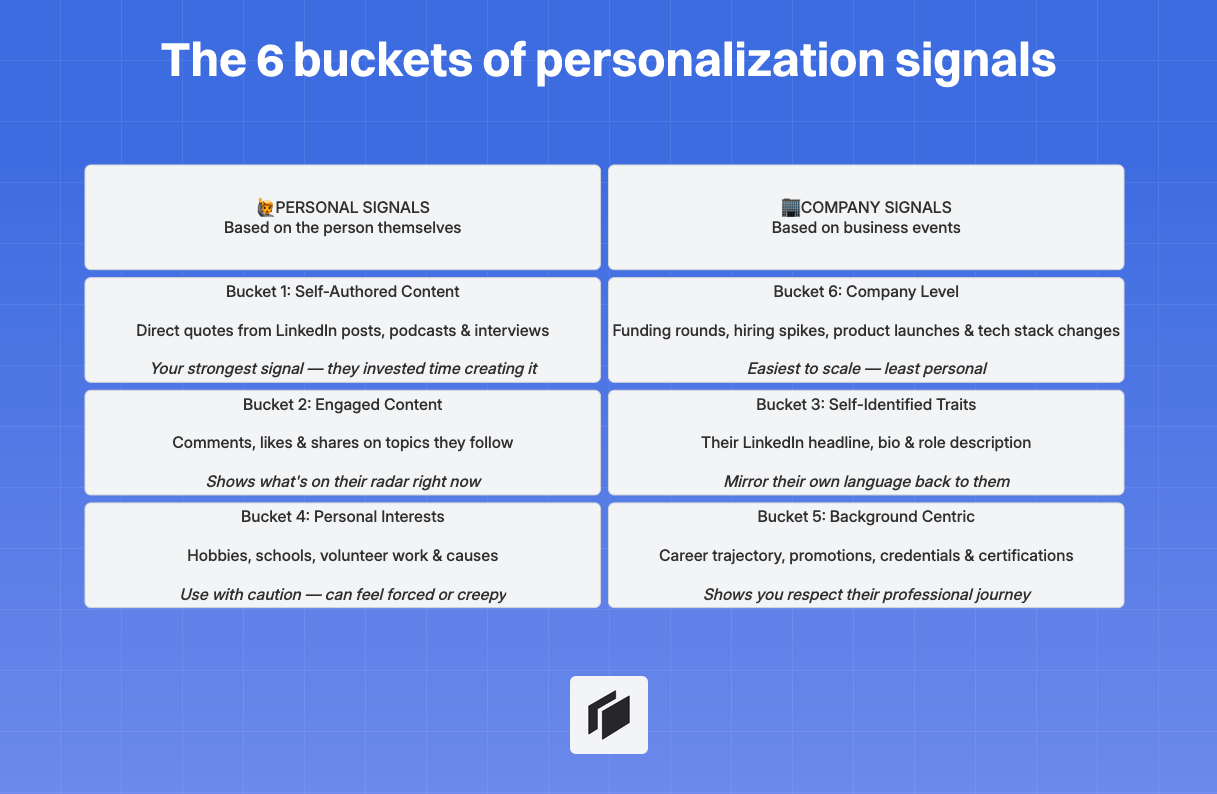
1. Company trigger signals (highest urgency)
Business events that create budget, urgency, or a new decision process — and they explain why now. Most are fully automatable.
- Funding announced — New capital means budget, hiring, and growth pressure. Pull from Crunchbase, PitchBook.
- New exec hired — New CRO/CMO/VP resets priorities and vendor relationships. Pull from LinkedIn job-change tracking.
- Rapid hiring in a function — Scaling SDRs or RevOps? Active projects create tooling needs. Pull from ATS pages (Greenhouse, Lever).
- M&A activity or product launches — Integration and new offerings create process and tooling gaps. Pull from news monitoring.
- Layoffs or reorganization — Pain triggers replacement and consolidation. Pull from layoff trackers and news.
Example: “Noticed {{company}} just closed a Series B — when you’re scaling that fast, most teams struggle with {{problem}}. Does that ring true?“
2. Talent and hiring signals (who’s building what)
Job descriptions are public and incredibly revealing about what a company is building and where they have gaps.
- Hiring for your category or adjacent roles — They’re buying or building in your space. Look for SDR, RevOps, or marketing hires. Pull from job boards, ATs feeds.
- Senior role vacancy — A missing VP Sales or Head of RevOps is a gap you can fill. Pull from career pages, LinkedIn alerts.
- Recent promotion or new manager — New leaders review tools within their first 45 days — the most responsive window for outbound. Pull from LinkedIn alerts, People Data platforms.
Example: “Saw you’re hiring a Head of RevOps — most teams at your stage discover {{problem}} during that search. Quick thought?“
3. Self-authored and engaged content (highest relevance)
Content the prospect created or interacted with — the gold standard because they invested time.
- Self-authored: LinkedIn posts, podcast appearances, webinars, articles. Use a direct quote for maximum impact. “In your post about SDR burnout, you wrote ‘the biggest issue is lack of quality leads’…”
- Engaged content: Posts they commented on, shared, or liked. “Noticed you’ve been engaging with posts about pipeline predictability…“
4. Web intent signals (buying behavior)
What prospects do on your site tells you exactly where they are in their buying journey.
- Pricing page visit — Strongest purchase-intent signal. Follow up within 24 hours.
- Case study or comparison page visit — They’re validating against alternatives. Personalize around what they viewed.
- Documentation or integration page visit — Technical evaluation. Send deep-dive content.
- Repeated visits — Return visits dramatically increase in-market confidence.
Example: “Noticed your team was looking at {{use case}} — here’s how {{similar company}} got {{result}}.“
5. Technographic signals (stack and vendor intelligence)
Knowing what tech a company uses — especially what they might replace — is one of the most actionable angles.
- Competitor technology detected — Perfect for switch campaigns. You know their pain points. Pull from BuiltWith, Wappalyzer.
- Old or outdated tech — Replacement opportunity. Check job descriptions mentioning legacy systems.
- CRM or marketing stack change — Operational change means retooling — great moment for a complementary tool.
Example: “Most of our customers came from {{competitor}} — they were spending too much time on {{pain point}}. Sound familiar?“
6. Self-identified traits and background
How prospects describe themselves in their LinkedIn headline, “About me” section, or career history. Lower urgency but excellent for showing you understand their world.
- Self-identified traits: Their chosen words in their bio or headline. “Your headline mentions leading ROI-focused teams…”
- Background centric: Career trajectory, tenure, certifications, mutual connections. “Since moving from {{previous role}} to leading {{current team}}…”
- Personal interests (use sparingly): Hobbies, schools, causes. Good for pattern interrupts but can feel creepy if overused.
Turning signals into hooks
Two patterns work across categories:
- Strong hook (verbatim tie): Direct quote or specific reference. “In your post about cold reply rates being ‘broken’…” High impact. Use for high-value prospects.
- Lite hook (conceptual tie): Reference the theme without a direct quote. “Noticed {{company}} is scaling the sales team…” Lower effort, effective for volume.
The critical rule: Your hook must connect to your pitch. Always bridge from their signal → their likely problem → your solution.
How to personalize at scale
Cockpit lets you handle deep personalization right from a spreadsheet, combining 27+ enrichment providers with AI-powered copy generation.
-
Import leads: Bring in contacts from LinkedIn Sales Navigator, your CRM (HubSpot, Pipedrive, Attio), or upload a CSV. Cockpit’s built-in filtering helps you stay laser-focused from the start.
-
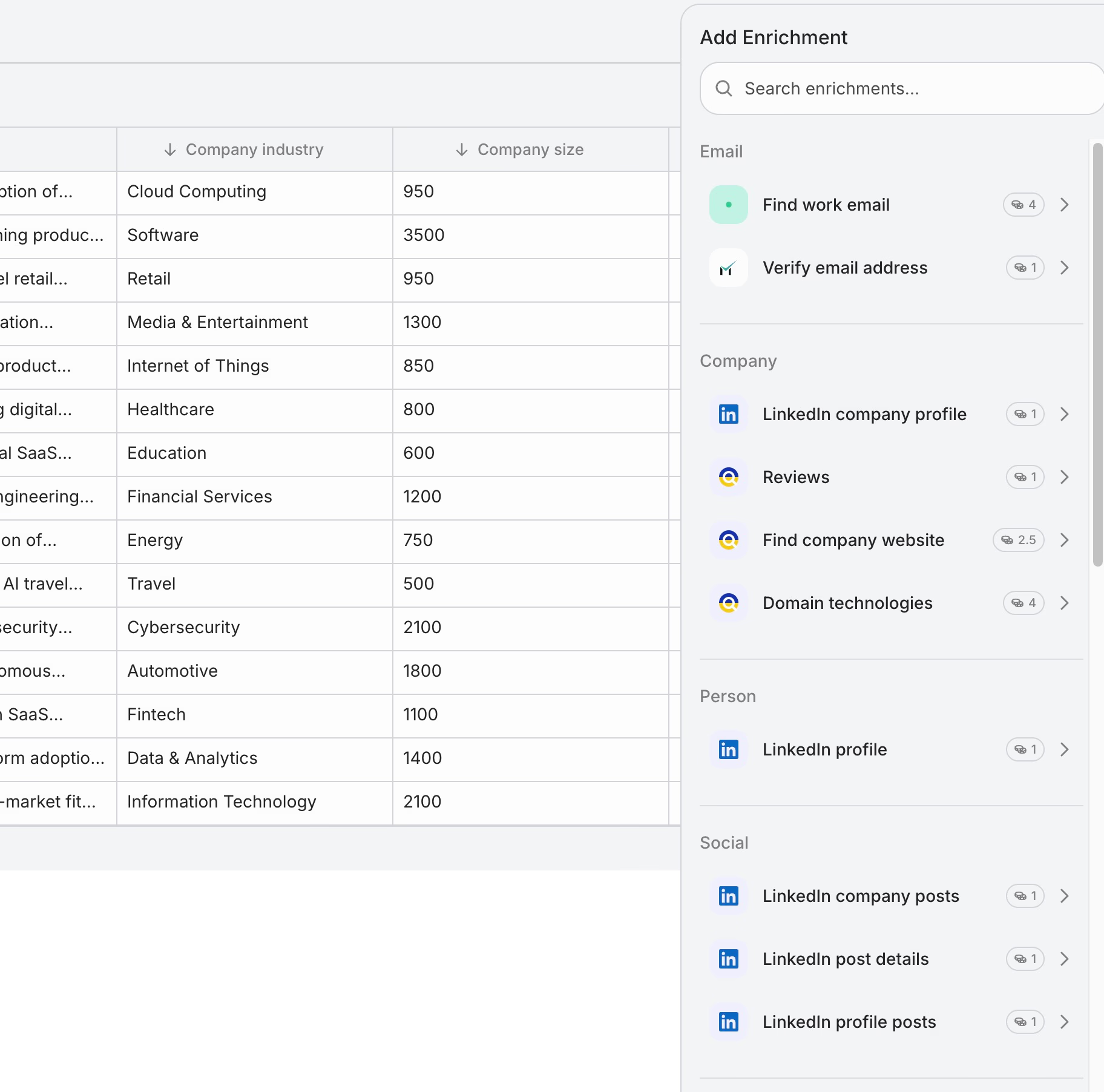
Enrich with context: Cockpit’s waterfall enrichment pulls from 27+ providers — LinkedIn activity, company news, tech stack, funding events, traffic, ads and more. If one source misses a field, the next fills it in, so nothing is left blank.
-
AI columns for personalized copy: Use Cockpit’s AI columns to generate unique opening lines, hooks, and full email drafts. Just prompt: “Reference their last LinkedIn post about [topic] and mention that [company] recently raised [funding_amount].” The AI reads enrichment data from other cells and produces hundreds of unique drafts — no manual work.
-
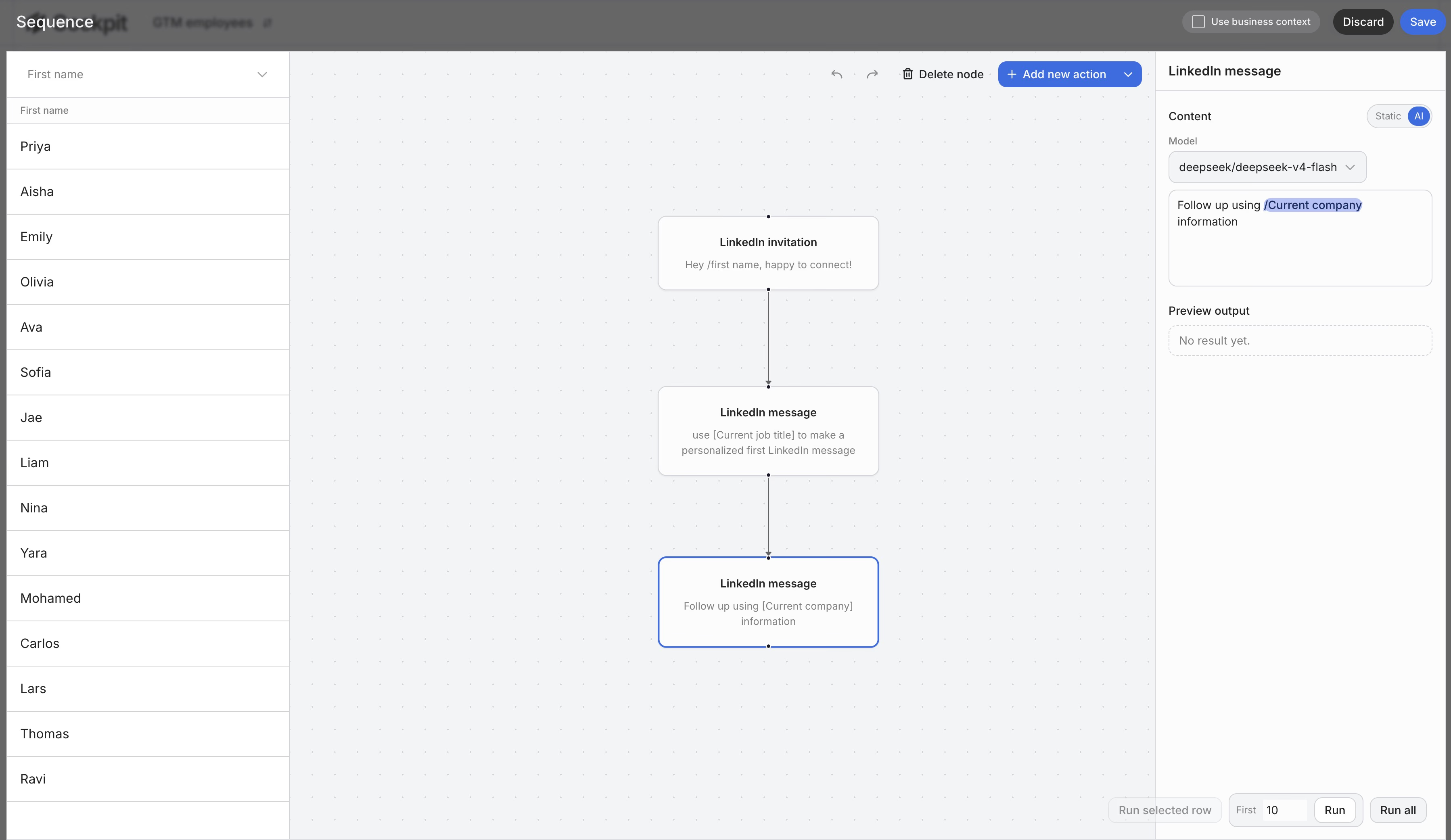
Build sequences with Sequence columns: Cockpit’s Sequence columns let you build multi-step outreach right in the grid — Email 1 (trigger-based opening), Email 2 (pain/KPI focus), Email 3 (delegation ask), Email 4 (break-up). Each step pulls from enrichment data to stay relevant across every touchpoint.
-
Sync and send: Push your enriched leads with personalized copy to Instantly, Smartlead, or Lemlist for automated sending — or export back to your CRM for tracking.
This approach brings you research-driven personalization that used to demand a whole SDR bench.
7 cold email templates that get responses
Quick question template
This one puts the recipient in the expert seat. The subject is neutral, and you start with a straightforward observation. The real aim is to start a low-pressure conversation, not a sales pitch.
Example:
Subject: quick question about [company]'s outbound

Noticed [company] is scaling the sales team this quarter.

Quick question: how are you handling lead research and personalization as you add reps? Doing it manually, or have you found a way to automate it?

Either way, curious to hear. We've been working on this problem.

[Name]
Third-party connection template
Mentioning a mutual contact or shared group builds instant credibility. A familiar name can make your email feel warmer and more relevant right away.
Example:
Subject: [Mutual connection] mentioned you

Hey [First name],

[Mutual] said you’re leading outbound at [company] and growing fast. They thought we should connect.

We've helped similar teams ([example company]) automate research so reps actually spend more time selling. If that's a pain point right now, happy to share what's actually working.

Worth a 15-min call, or is this bad timing?

[Name]
PAS template, problem, agitate, solve
Call out a clear pain point, highlight what it’s costing them, then show how you remove the headache. This format works best when the problem is specific and easy to recognize.
Example:
Subject: the SDR research bottleneck

Reps spend about 30% of their week on research, finding emails and building personalization. That’s 1.5 days each week not selling.

We built [product] to handle this: just import leads, enrich automatically, and generate personalized copy in one spreadsheet.

[Similar company] cut research from 2 hours a day to 15 minutes. Happy to show how.

[Name]
Straight-to-business template
For executive outreach, less is more. State the value and give proof, skip the warm-up. This approach keeps the message direct and easy to scan.
Example:
Subject: outbound at scale without the ops overhead

[First name] —

We help lean sales teams pull off personalized outbound at scale, with no ops person needed. Import leads, enrich automatically, and generate custom copy, all in one tool.

[Similar company] scaled from 50 to 500 leads per week without hiring anyone new.

Want to see how it works?

[Name]
Paint-a-picture template
Let your prospect see exactly how life gets better if they switch. The goal is to make the improved outcome feel concrete and immediate.
Example:
Subject: [company] reps and research time

Right now, your SDRs probably spend the first hour each day combing for contact info and LinkedIn signals.

Or, they could just open their laptop to 50 enriched leads, emails verified, personalized openers already done.

That’s what [product] does. [Similar company] made the switch last quarter. Curious if that would help at [company]?

[Name]
AIDA template, attention, interest, desire, action
Walk them logically from a recent change to a clear call to action. Each line should move the prospect one step closer to replying.
Example:
Subject: cutting [company]'s outbound research time by 80%

[Attention] You're hiring 4 SDRs, usually means research gets bottlenecked.
[Interest] Reps spend 30% of their time just finding contacts before any outreach.
[Desire] We helped [similar company] cut that to 15 minutes a day using auto enrichment and AI-powered personalization.
[Action] Worth 15 minutes to see if this would fit at [company]?

[Name]
Something useful template
Lead with something valuable, a resource or benchmark tied to what they’re working on right now. Giving value first can make the outreach feel helpful instead of promotional.
Example:
Subject: something for the [company] SDR ramp

We just published a playbook on how top teams use AI to personalize outbound at scale, no ops expertise required.

Saw [company] is scaling the sales team, so figured this could help: [Link]

If it’s useful and you want to see it in action, happy to walk you through it.

[Name]| Template | Best For | Personalization Level |
|---|---|---|
| Quick Question | Starting conversations | Medium |
| Third-Party Connection | Warm introductions | Low |
| PAS | Known pain points | High |
| AIDA | Structured pitch | Medium |
| Straight-to-Business | Executives | Low |
| Paint-a-Picture | Outcome-focused buyers | High |
| Something Useful | Value-first approach | Low |
How to write follow-ups that actually get replies
The 4-email sequence framework
Each step in your sequence needs a fresh angle.
| Timing | Angle | |
|---|---|---|
| 1 | Day 1 | Trigger-based opening: why now? |
| 2 | Day 4 | Pain/KPI focus: spotlight a real challenge |
| 3 | Day 18 | Delegation ask: find the right contact |
| 4 | Day 25+ | Breakup: permission to close the loop |
Each email should feel distinct, relevant, and easy to reply to.
Email 1: Trigger-Based Opening
Start with something timely, maybe they just raised funding or went on a hiring spree.
Connect that event to a concrete challenge they’re likely facing. For instance: “Teams at your stage often hit lead quality issues as they scale. We helped [peer] move to a 12% reply rate.”
Email 2: Pain/KPI Focus
Jump straight into the problem. “SDRs often lose hours on bad leads, leaving pipeline on the table. [Similar company] freed up 15 hours per week by fixing their enrichment.”
Make the ask easy to say yes to, like: “Worth a quick look?” A clear pain point usually works better than a generic follow-up.
Email 3: Delegation Ask
Still getting silence? Switch up your subject line and approach.
Try: “Not sure if lead enrichment falls under your scope. Who is the best person to chat with regarding data quality?” This makes it simple for them to forward your email without feeling put on the spot.
Email 4: Breakup Email
Sign off gracefully. “It seems this isn’t a priority right now, so I’ll close the loop. If outbound personalization becomes a focus later, let’s reconnect.”
This last note often gets the most replies, because it removes pressure while leaving the door open.
Adding value over “just checking in”
“Just checking in” emails? Skip them. They add nothing and usually get ignored.
Give them an actual reason to respond:
- Share new proof: “We just helped [peer] cut research time by 70%, which might be relevant to your recent hiring.”
- Highlight a different pain: “Noticed you’re ramping SDRs, faster onboarding is usually a focus. Is that on your radar?”
Never recycle your emails. Treat every touch as if it’s the only one they’ll see. Each one needs to make sense on its own.
Multi-channel coordination
Stacking channels boosts your odds of getting noticed.
A typical flow could look like this:
- Day 0: Email #1
- Day 2: LinkedIn connection request
- Day 4: Email #2
- Day 7: LinkedIn message
- Day 18: Email #4, breakup
Using more than one channel helps your sequence feel more natural and more visible.
How to use AI without sounding like AI
AI-generated emails usually miss the mark because they lean on stiff phrases like “leveraging synergies” or “I came across your profile.” Most prospects spot this a mile away and hit delete without a second thought. If you want replies, you need to use AI to turn genuine enrichment data into actual, human observations.
It starts with lead data. When you import leads into Cockpit and add enrichment columns, like recent LinkedIn activity, hiring trends, or the tech stack they use, you give the AI context about each recipient.
When you prompt the AI, try referencing those concrete details. Instead of something generic like “I noticed your profile,” the AI can go with: “I saw you’re hiring for a Head of Growth, your post from last week about SDR onboarding challenges caught my eye.” If you can strip out the opening and the rest of the email still works for another lead, the personalization didn’t cut deep enough.
Refining the output
Cockpit’s AI columns let you build prompts that pull straight from your enrichment data — but the quality of the output depends on how you prompt it. Here’s how to turn AI-generated drafts into emails that sound like they came from a real person:
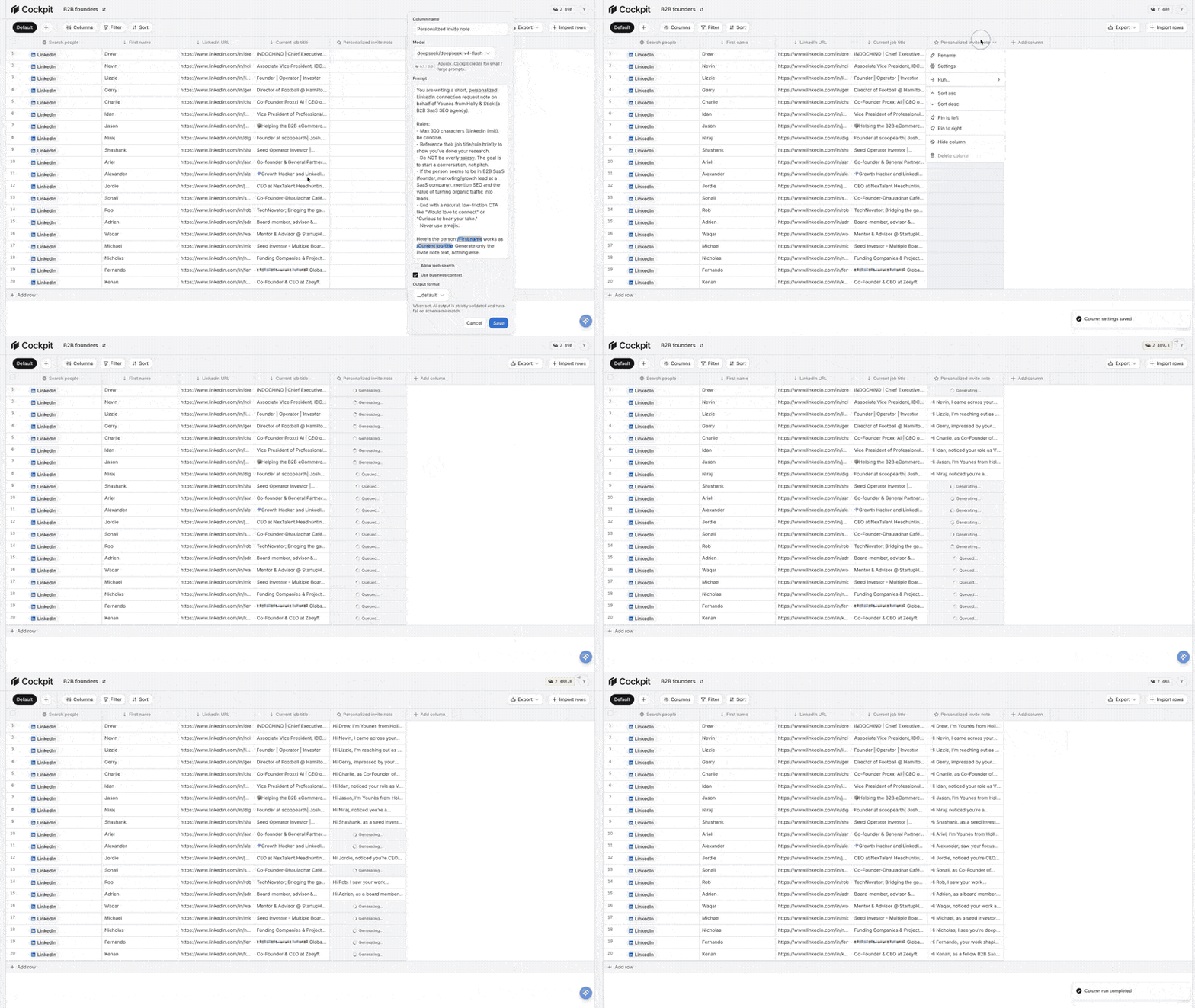
- Use enrichment variables, not fluff: Instead of generic phrases, prompt the AI to reference specific data points from your enrichment columns — job title changes, recent company news, a LinkedIn post topic. Example prompt: “Write a 3-sentence opening email for {first_name} at {company}. Reference that {company} recently {recent_news}. Tone: direct, no jargon.”
- Cut the jargon: Drop anything like “best-in-class,” “unleash,” “synergy,” or “vibrant.” If you wouldn’t say it in a coffee meeting, don’t put it in an email.
- Read it out loud: If it sounds like marketing copy or something a bot would write, rework it. Every line should feel like it’s from someone who knows the recipient’s world.
- Lead with the signal: Make sure the personalization connects directly to the problem you’re solving, not just a throwaway opener. “Saw your post on scaling SDRs” works. “I see you like hiking” doesn’t.
Done right, AI becomes a force multiplier for your own research. By anchoring every draft in real enrichment signals, you can scale outreach that actually gets responses — without sounding synthetic or automated.
Cold email do’s and don’ts checklist
Do’s
- Lead with them. Start with “you” and “your” from the first line. The opener should show you understand the recipient’s world. Mention a recent quote, post, or milestone, not just their company.
- One low-friction CTA. Give them a single, easy next step, something simple like “Worth exploring?” Instead of asking for a meeting right away, show curiosity and see if they’re interested.
- Use quantified proof. Get specific. Results like “increased reply rates from 2% to 12% in 6 weeks” show credibility fast.
- Tie personalization to the pitch. The research you do is only useful if it connects to the problem you solve. Reference self-authored content from your recipient to connect the dots to your offer.
- Master the breakup. The last email in your sequence often gets the most replies. Try, “Should I close the loop on this?” It gives people an easy way out, and often gets them to engage.
- Prioritize deliverability. Authenticate with SPF, DKIM, and DMARC. Use a dedicated sending domain and warm it up before starting your campaigns.
- Time it right. Stick to Tuesday through Thursday, 8–10 AM in your prospect’s timezone. If someone’s new in their role, days 14 to 45 are when they’re most likely to respond.
Don’ts
- Avoid “template-speak.” Ditch lines like “I hope this finds you well” or “I came across your profile.” They scream automation.
- Don’t feature-dump. One sharp proof point beats a list of every feature. Lead with their pain and the outcome you deliver.
- Skip images and HTML. Plain text keeps your emails out of spam. If you use a link, make it count, and don’t flood them with multiple URLs.
- No deceptive subject lines. Using fake “Re:” or “Fwd:” tricks destroys trust fast. Stick to straightforward, memo-style subject lines.
- Don’t “just check in.” Every follow-up needs a reason, a new perspective, insight, or stat. Never settle for a generic nudge.
- Avoid heavy asks. Don’t open with a 30-minute demo invite. Start with something much lighter.
- Kill the jargon. Ditch words like “synergy,” “leverage,” or “best-in-class.” They make your outreach feel like any other marketing message.
The final gut-check
Before you hit send, run through these five questions:
- Does this sound like an actual human, not another vendor?
- Would I reply to this myself?
- Is every line working for the reader, not just for me?
- Is the personalization tied to a real challenge?
- Is my ask clear, and easy to say yes to?
If you cannot answer yes to all five, revise the email before sending it.
Start sending cold emails that actually get replies
Writing cold emails that get responses isn’t about clever tricks. It’s about relevance.
The best emails in this guide share the same DNA: they open with a specific, real observation, tie it to a problem the recipient actually has, make one clear and low-friction ask, and follow up with genuine value.
You’ve seen the anatomy of a high-converting email, the templates that work, how to research at scale, and how to use AI without sounding like a robot. Now the only thing left is execution.
Start with one prospect. Apply the gut-check. Send it.
The rest is a numbers game, but only once the quality is right.