
Most sales teams think personalization means dropping a {first_name} tag into a template. That is not personalization. It is the bare minimum.
The jump from basic merge fields to true signal-based outreach is the single biggest lever you can pull. It can take your reply rates from 2% to 20% or more. This guide breaks down exactly how to do that with 6 personalization buckets and a step-by-step workflow you can scale to hundreds of prospects.
Why basic personalization no longer works in 2026
First name and company fields are now the minimum wage of outbound. By 2026, every sales team auto-fills those merge fields without thinking.
Tossing them into emails isn’t personal. It’s just table stakes, and it guarantees your message blends right into the noise.
Here’s what the real numbers show: personalization impact isn’t gradual, it’s a step change.
| Personalization Level | Typical Reply Rate |
|---|---|
| No personalization | 0-2% |
| Basic (name, company, title) | 2-5% |
| Signal-based | 5-10% |
| Multi-signal stacked | 10-20% |
Batch-and-blast emails barely scrape a 3% reply rate. Basic personalization might get close to 10% if you’re lucky.
If you actually want to land in the 15-25% range, you have to shift to signal-based outreach. This means your emails are anchored on real trigger events:
- New executive hires: “First 90 days means quick wins; here’s one we deliver in week two.”
- Earnings calls: “Your CEO made pipeline the focus for H2. We can help.”
- Marketing signals: “Your ad spend jumped 40% on LinkedIn — most teams see lead quality drop when they scale demand gen this fast.”
- Website intelligence: “Noticed you added enterprise pricing and SOC 2 compliance. Growing upmarket? Here’s how we help teams scale outbound for enterprise.”
Cut the icebreakers. Dodge AI-generated openers. None of that matters.
The only thing that counts is showing that you actually understand what’s happening for the person you’re emailing. That’s what makes you relevant.
Some still argue for value-driven, conversational emails with just a sprinkle of personalization, especially in high-volume SMB outreach.
But if you settle for that, you’ll look like every other vendor in the inbox. If your pitch is stuck at, “Hi {First}, noticed you work at {Company}…,” don’t expect a response.
The 6 buckets of personalization
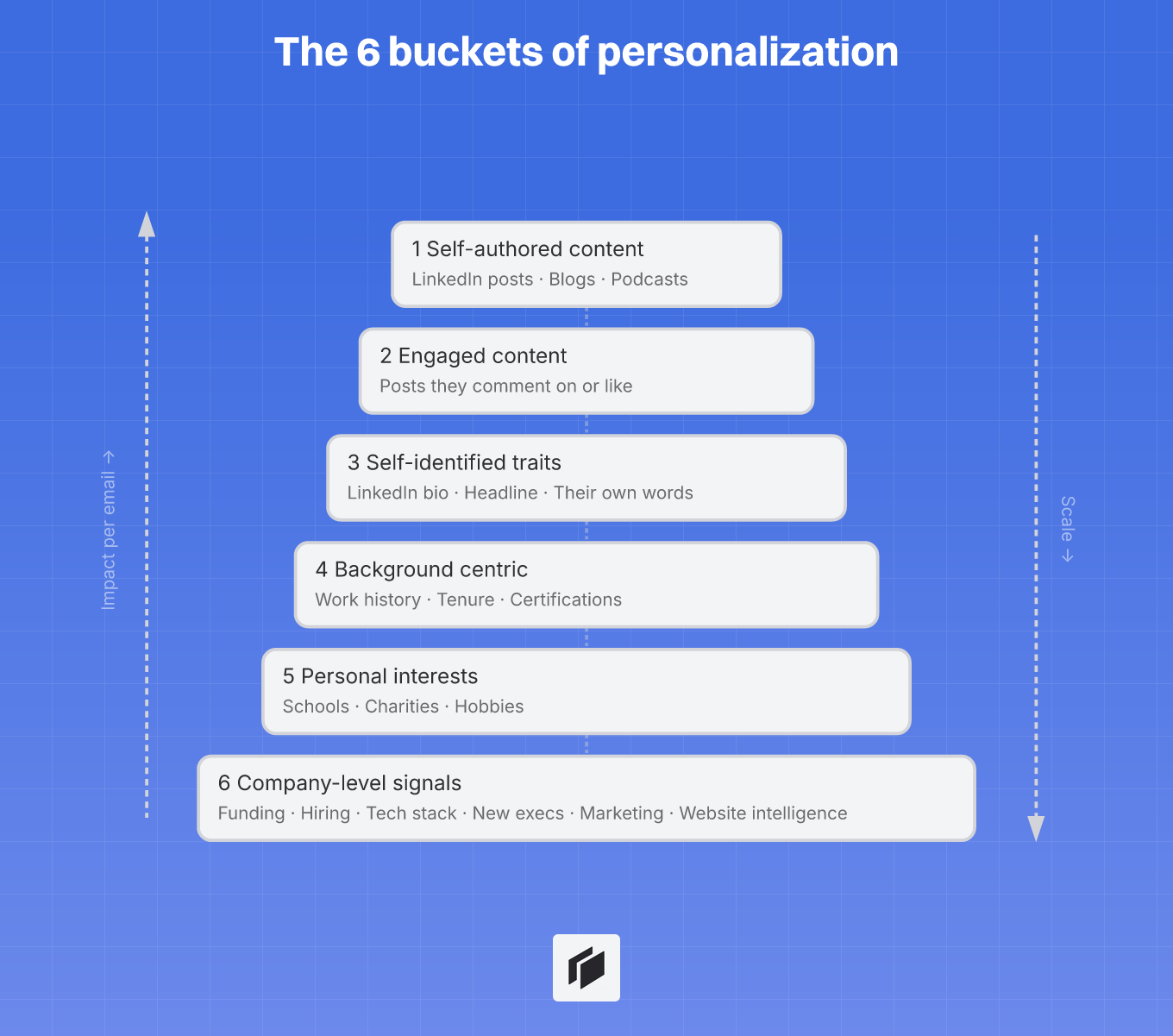
Self-authored and engaged content (buckets 1-2)
Calling out something a prospect created or engaged with gets the best response rates, hands down. These signals sit at the top for a reason, they show you’ve done your homework and can speak to specifics.
- Self-authored content: Quote them from a LinkedIn post, blog, or podcast. Try, “In your podcast with [Host], you mentioned [specific idea]…” Doing this reliably unlocks 15-25% reply rates with enterprise prospects. The catch? It takes real research time.
- Engaged content: Reference posts they comment on or like. “Noticed your comments on [theme]…” works even if they aren’t creating their own posts.
Save these deeper signals for your highest-value 20%, think deals over $100K, or accounts you’ll chase for months.
Self-identified traits and background (buckets 3-5)
Here, you get scale without completely dropping relevance, by borrowing how the prospect describes themselves and their journey.
- Self-identified traits: Pull from their LinkedIn bio or headline. Using their own words, “You call yourself a ‘sales ops nerd’ , here’s something up your alley…” builds rapport fast.
- Background centric: Bring up work history, tenure, or any certifications. “Saw you moved from [previous role] to [current team]…” signals you aren’t blasting everyone the same way.
- Personal interests: Schools, charities, and hobbies can cut through the noise in the right moment. Don’t overdo it, these details are usually better for rapport after someone’s replied.
Company-level signals (bucket 6)
When you need to go wide, company-level triggers are home base. They’re plugged into business context, and they scale easily.
- Funding rounds: New cash often brings new problems to solve.
- Hiring surges: Shows they’re racing to scale and probably facing growing pains.
- Tech stack changes: Could be primed for integrations or migrations.
- New executive hires: Leadership changes shake up priorities.
- Product launches: Signal fresh go-to-market efforts.
- Marketing signals (ads, traffic): Ads budget spikes or traffic surges from Similarweb reveal where they’re investing — and where they’re feeling competitive pressure.
- Website intelligence (pricing, features, clients, awards, compliance, integrations): AI now extracts pricing pages, feature lists, client logos, certifications, and partner integrations from any company website in seconds. Each is a personalization angle.
Signal-to-message mapping:
| Company signal | Personalization angle |
|---|---|
| Funding round | ”Congrats on the raise. Most teams hit process bottlenecks after a round like this…” |
| New exec | ”Saw you brought on [Name], new leadership usually prioritizes quick wins…” |
| Hiring surge | ”Hiring 5+ SDRs? Scaling outreach fast often leads to [challenge]…” |
| Tech stack change | ”Noticed [tool] was added, integrating with [solution] is usually the next step.” |
| Marketing signals | ”Saw your ad spend jumped 40% on LinkedIn — scaling demand gen? Most teams hit a lead quality wall at this stage.” |
| Website intelligence | ”Noticed you just added SOC 2 compliance and an enterprise plan. Growing upmarket? Here’s how we help teams like yours scale outbound for enterprise.” |
When to use each bucket
Your research effort should always match the deal size. It’s too easy to lose hours somewhere it won’t pay off.
- Enterprise ($100K+): Go deep with buckets 1-2, hyper-personalizing for anyone with a say.
- Mid-market ($25-100K): Buckets 3-5 work well. Focus on their role and career moves.
- SMB/Volume: Stick to company-level signals (bucket 6). These triggers keep your outreach relevant at scale.
- No research time: Rely on firmographic or technographic basics, industry, company size, tech stack.
Treat these buckets as your triage board. Invest where you’ll see real impact. Cockpit makes it easy to blend these signals, scale research, and kill generic outreach for good.
The 5-step workflow to personalize at scale with Cockpit
Step 1: Import leads from any source
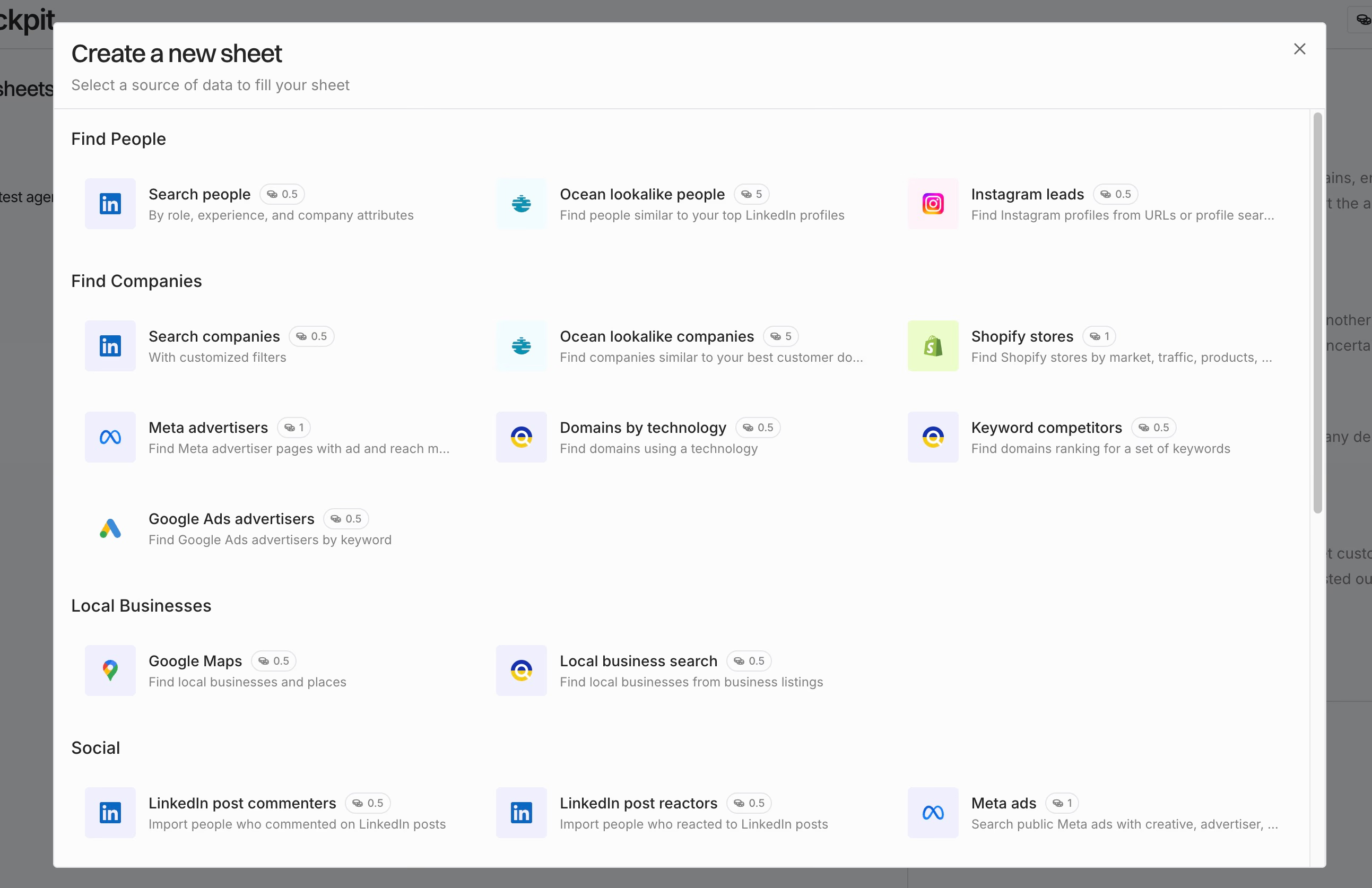
Hook up your lead sources directly to your grid. Cockpit takes LinkedIn Sales Navigator exports, Google Maps scrapes, CSVs, or CRM contacts from HubSpot, Pipedrive, and Attio.
You can also bring in leads from Crunchbase-style platforms, Shopify store locators, or even Instagram and YouTube profiles. All your data lands as editable rows, ready to work with in one place.
Step 2: Enrich with personalization hooks
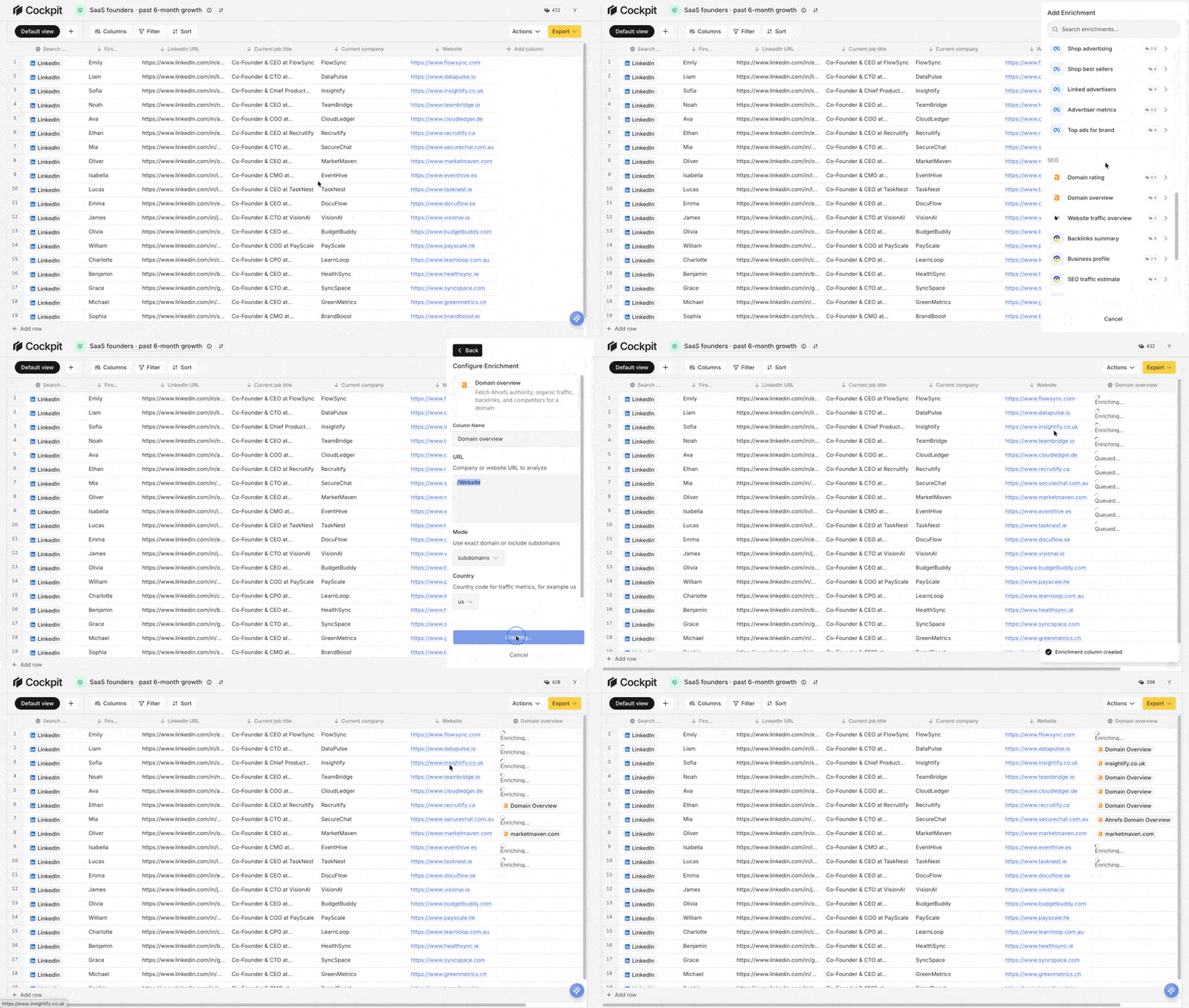
Turn lifeless spreadsheets into real context by pulling in 27 built-in enrichment providers (opens in a new tab) .
- Verification: Quickly find and verify emails with Icypeas or MillionVerifier.
- LinkedIn deep-dives: Pull in headlines, recent LinkedIn posts, skills, and company blurbs.
- Signals: Bring in funding rounds, hiring streaks, or new press mentions.
- Marketing intelligence: Pull ad spend trends, traffic sources (SEO, SEA, social), and competitor positioning from Similarweb and other platforms.
- Website scraping: Extract pricing pages, feature lists, client logos, awards, compliance certifications, and partner integrations from any company website in seconds.
- Tech stacks: Surface tools and platforms with Ahrefs, Similarweb, or DataForSEO.
This gives you the context you need to personalize outreach without manual research.
Step 3: Generate personalized copy with AI columns
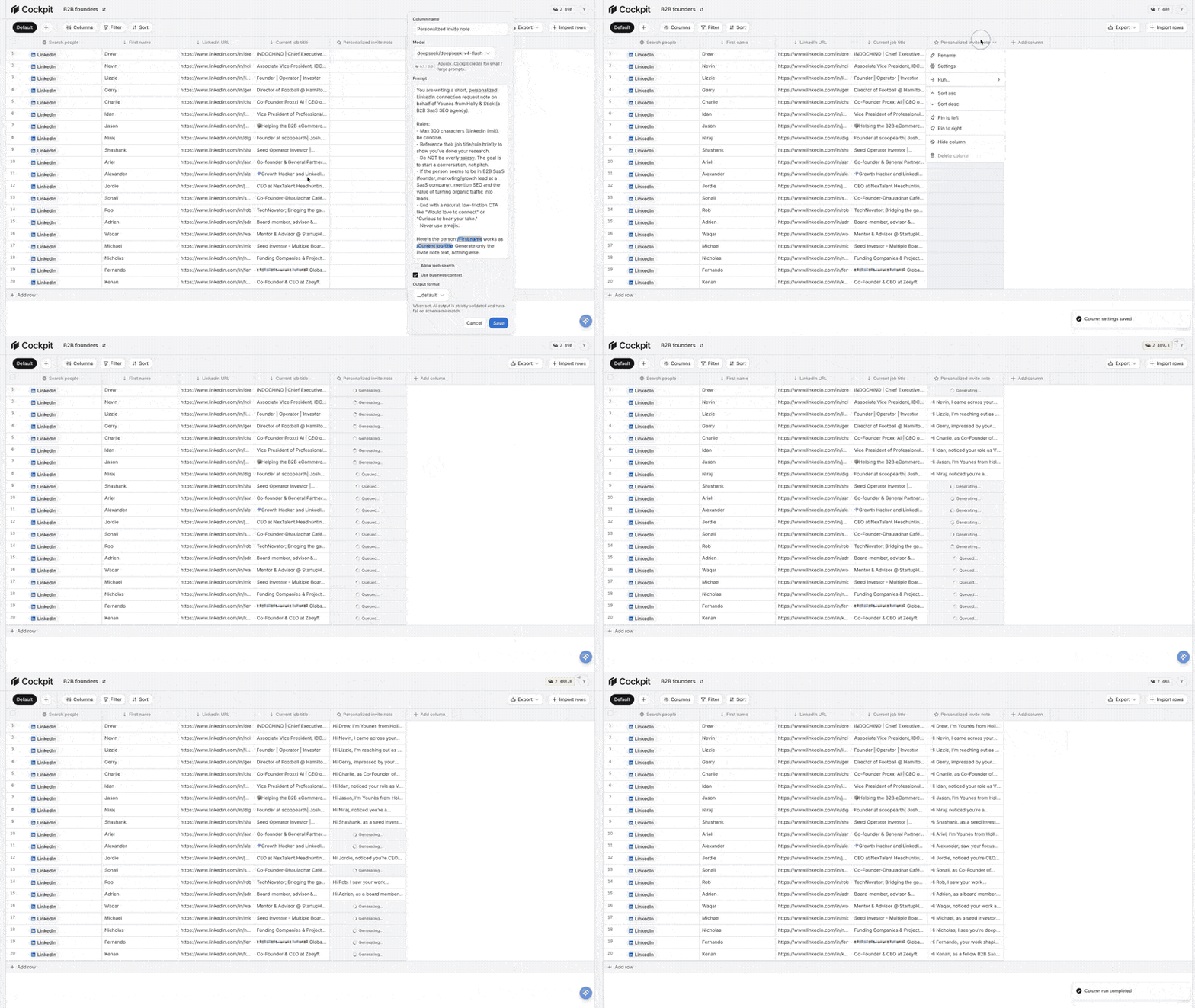
Connect all those new data points with AI Answer columns. Just write quick prompts referencing any cell in the row, like: “Write an opener for {name} mentioning their recent {funding_event}.”
Cockpit writes something unique for each prospect, so there are no more dusty old merge fields.
If you’ve got company news and tech stack data, AI might draft: “Congrats on integrating HubSpot after your Series A, most teams struggle with CRM hygiene during this level of growth.” Every cell stays editable for final tweaks.
Step 4: Build multi-step sequences
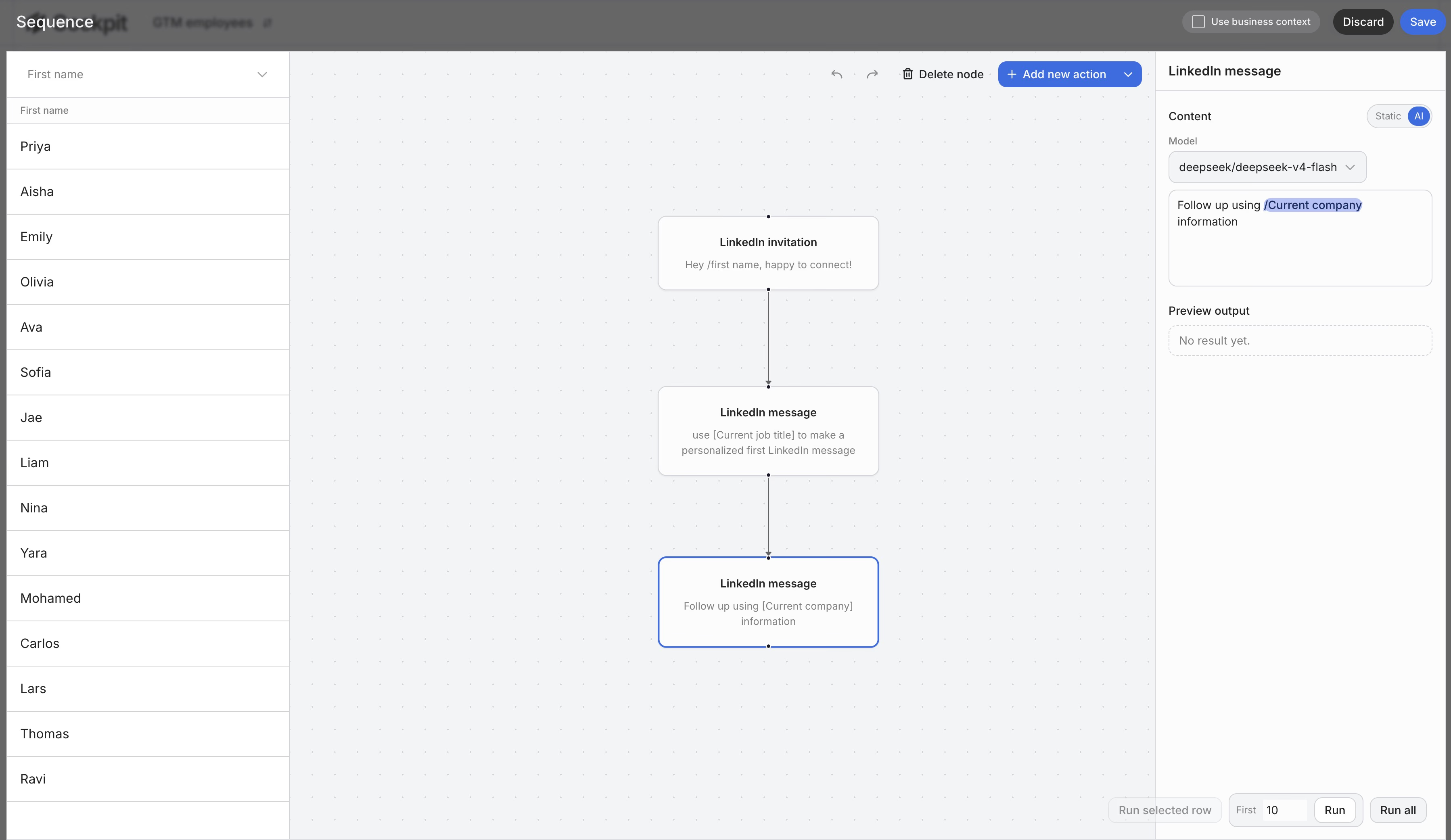
Set up outreach sequences, emails, LinkedIn invites, and follow-ups, right inside your grid. Each touch can reference a different signal.
For example, you might use a recent LinkedIn post in the first step, then a flurry of hiring in the second. The visual sequence builder lets you control timing and see every output before you hit send.
You manage your entire funnel, from value-add follow-ups to break-up emails, without bouncing between half a dozen tools.
Step 5: Export or sync
Rows fully tailored and sequenced? Send them out fast:
- Direct sync: Push to Lemlist, Instantly, or Smartlead with a click.
- CRM push: Sync results back to your CRM for tracking.
- Export: Download as a CSV for manual review or uploading elsewhere.
Cockpit handles the mapping, so founders and lean teams can go from list-building to send queue in one place. This workflow pulls together data, enrichment, and sending into one streamlined process.
How to write personalized cold emails that convert at scale
Email anatomy: subject, opener, body, CTA
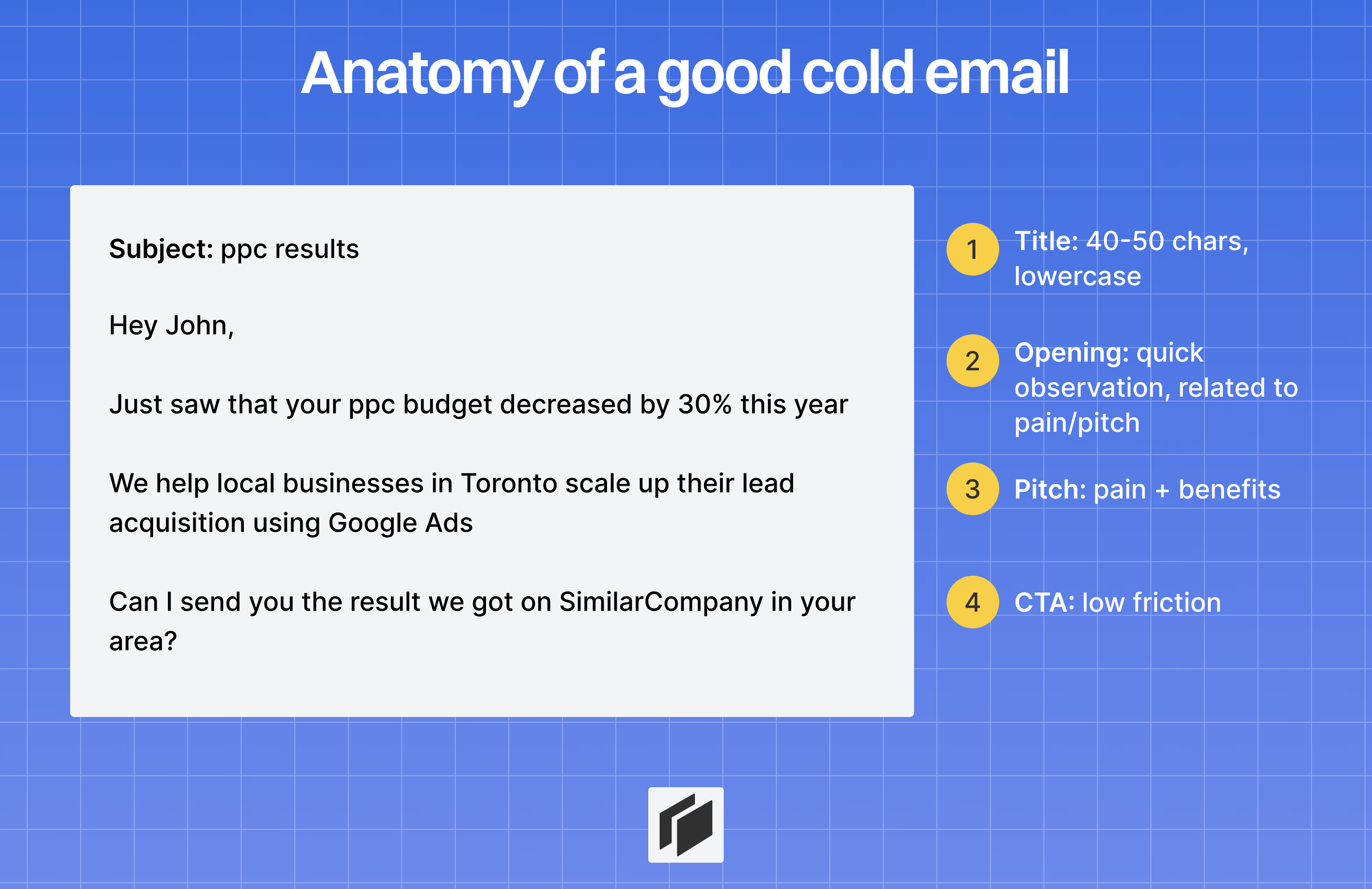
Every cold email has one job: show the recipient you understand their situation, fast, ideally within 60 seconds.
Subject line:
Stay under 40 to 50 characters. Anchor it to a clear signal, like a funding event, hiring surge, or new tech rollout. Don’t just drop a name.
Use a question or a break-the-pattern structure, for example:
- “question about your outbound process”
- “saw [company]‘s Series A announcement”
- “scaling your team, quick question”
Opening line:
You have 8 to 12 words to show you’ve done your research. Skip bland openers like “I hope this email finds you well.” Start with something about them:
- “Congrats on the Series A, scaling that fast is a beast.”
- “Your post on SDR productivity had me rethinking our process.”
- “Noticed you’re hiring AEs, figured your outbound is ramping.”
If your opener could go to anyone, toss it and try again.
Body:
Keep it tight, just two or three sentences. Call out a specific pain and tie it directly to what you offer.
Being brief shows you respect their time:
“Most teams spend 30% of their week just finding data to personalize outreach. We built [product] so you can enrich and generate messages in one spreadsheet. [Similar company] cut research time by 75%.”
CTA:
Go with one, low-bar ask. Simple yes or no questions beat big meeting requests every time:
- “Worth exploring?”
- “Open to a quick call this week?”
- “Curious if you’ve solved this already?”
Keep the whole thing between 50 and 125 words. Assume they’re checking email on their phone.
The 3 frameworks that work at scale
PAS, Problem, Agitate, Solution:
Spot a real pain. Dig into what happens if it sticks around. Then offer the fix. Use this when your research turns up a concrete challenge.
Example: “Most teams spend 1.5 days a week just on research. We built [product] to automate that. [Similar company] cut research time by 85%.”
AIDA, Attention, Interest, Desire, Action:
Hook them with something relevant. Build curiosity with a KPI that matters. Then close with a low-pressure ask.
Example: “Your team is hiring 4 SDRs, 4x the research required. We helped [competitor] slash research to 15 minutes a day. Worth a glance?”
Quick Question, Observation, Question, Minimal CTA:
Best if you want to kick off a conversation, not just pitch. Make a relevant observation, ask a simple question, and keep it open-ended.
Example: “Noticed [company] is scaling the sales team. How are you handling lead research as you add reps, manual or automated?”
What to avoid: Red flags and spam triggers
Certain phrases and habits are instant delete or blacklist material:
- “I hope this email finds you well”
- “I came across your profile”
- Vague buzzwords like “leverage,” “synergy,” or “best-in-class”
- More than one CTA or any high-commitment ask
- Subject lines that are just the recipient’s first name
Relevance is everything. If your “personalization” doesn’t actually change what you’re offering, toss it.
The goal: write like a peer, cut straight to value, and hit those 15 to 25% reply rates we mentioned earlier.
The 4-email sequence framework
Email 1, trigger-based opening (Day 1)
Start specific. Tell them exactly why you’re reaching out now, and tie it to something that just happened.
For execs, keep it tight, 2 to 3 sentences is usually enough.
- Pattern: Observation, the trigger, logical assumption, concrete social proof, open-ended question.
Example:
Noticed [company] just closed a Series B, congrats.
Most teams at your stage feel pain around lead quality as they scale. We helped [similar company] go from 2% to 12% reply rates by focusing on enrichment-first targeting.
Is that something you’re running into?
Never pitch a meeting here. Just open the loop.
Email 2, pain and KPI focus (Day 4)
Three days later, move from the external trigger to the actual pain point. Spell out what it costs them to ignore this, and mention a KPI at stake.
Example:
The biggest complaint I hear from sales leaders at growth-stage companies: SDR time wasted on bad leads.
Every hour spent chasing the wrong accounts is pipeline left on the table. [Similar company] freed up 15 hours/week per SDR after fixing their enrichment flow.
Worth a quick look?
Each email should stand alone. Prospects shouldn’t have to dig up old threads to follow along.
Email 3, delegation ask (Day 18, new subject line)
Two weeks in, start a new thread with a different subject line. This helps catch their eye and resets the context.
Example:
Subject: quick question
Hey [name],
Not sure if lead enrichment falls under your scope. Who’s the right person to chat with about how [company] handles prospect research?
Happy to be pointed in the right direction.
Email 4, break-up email (Day 25+)
If you still haven’t heard back, stop chasing. Say timing might be off and close the loop. Ironically, this is often when busy prospects finally reply.
Example:
Subject: should I close the loop?
Hey [name],
I’ve reached out a few times, guessing this isn’t a priority right now. I’ll close the loop on my end.
If outbound efficiency becomes a focus later, happy to pick this back up.
Sequence guidelines
- Never “Checking In”: Every touchpoint brings something fresh to the table.
- Soft CTAs only: Use prompts like “Worth exploring?” no meeting links until they’re interested.
- Keep it brief: Stick to 2 to 3 sentences for execs, 3 to 4 for managers.
- Reset the thread: Email 3 always gets a fresh subject line.
Cockpit handles all of this automatically, blending enrichment data, AI-generated copy, and timed sequences, then delivering everything straight into your sending platform.
Practical example: Personalizing 500 cold emails in Cockpit
Here’s how to transform hours of research into 500 high-quality, personalized cold emails without getting buried in manual work.
Step 1: Import 500 leads
Start by exporting your list from LinkedIn Sales Navigator, say 500 VPs at funded SaaS companies.
Just drop the CSV into Cockpit, or pull straight from the Icypeas LinkedIn search source.
Instantly, your grid fills up with names, company info, and LinkedIn URLs.
Step 2: Enrich rows with personalization angles
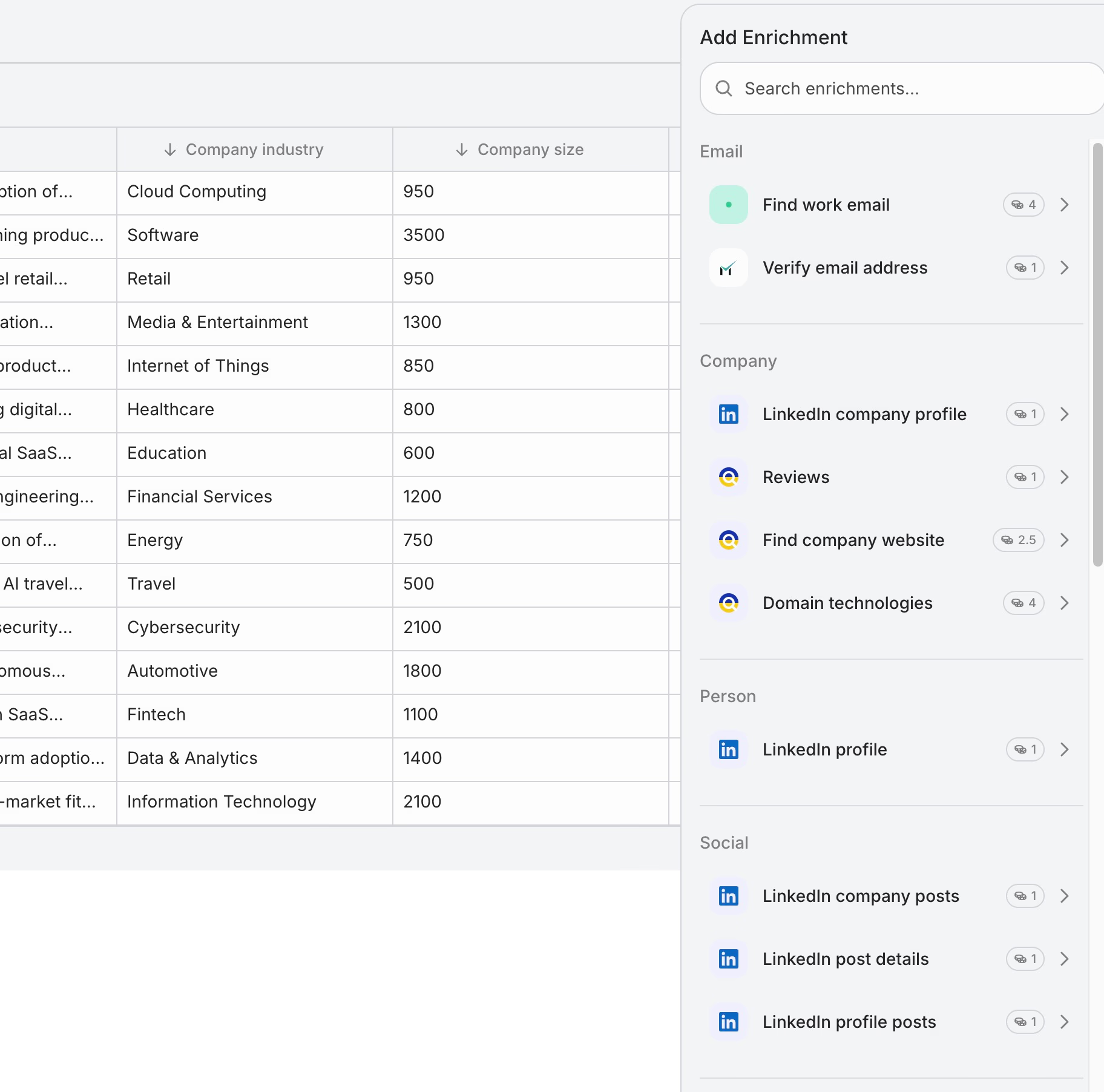
Now, turn that basic list into a dynamic data set by adding a few smart columns:
- LinkedIn enrichment: Grab their recent posts and latest company funding.
- Tech stack: With the domain technologies provider, see if they use specific tools like Salesforce.
- Web scraping: The Web Agent column pulls things like recent press releases or changes in company leadership from their blogs.
Step 3: Personalize the opener
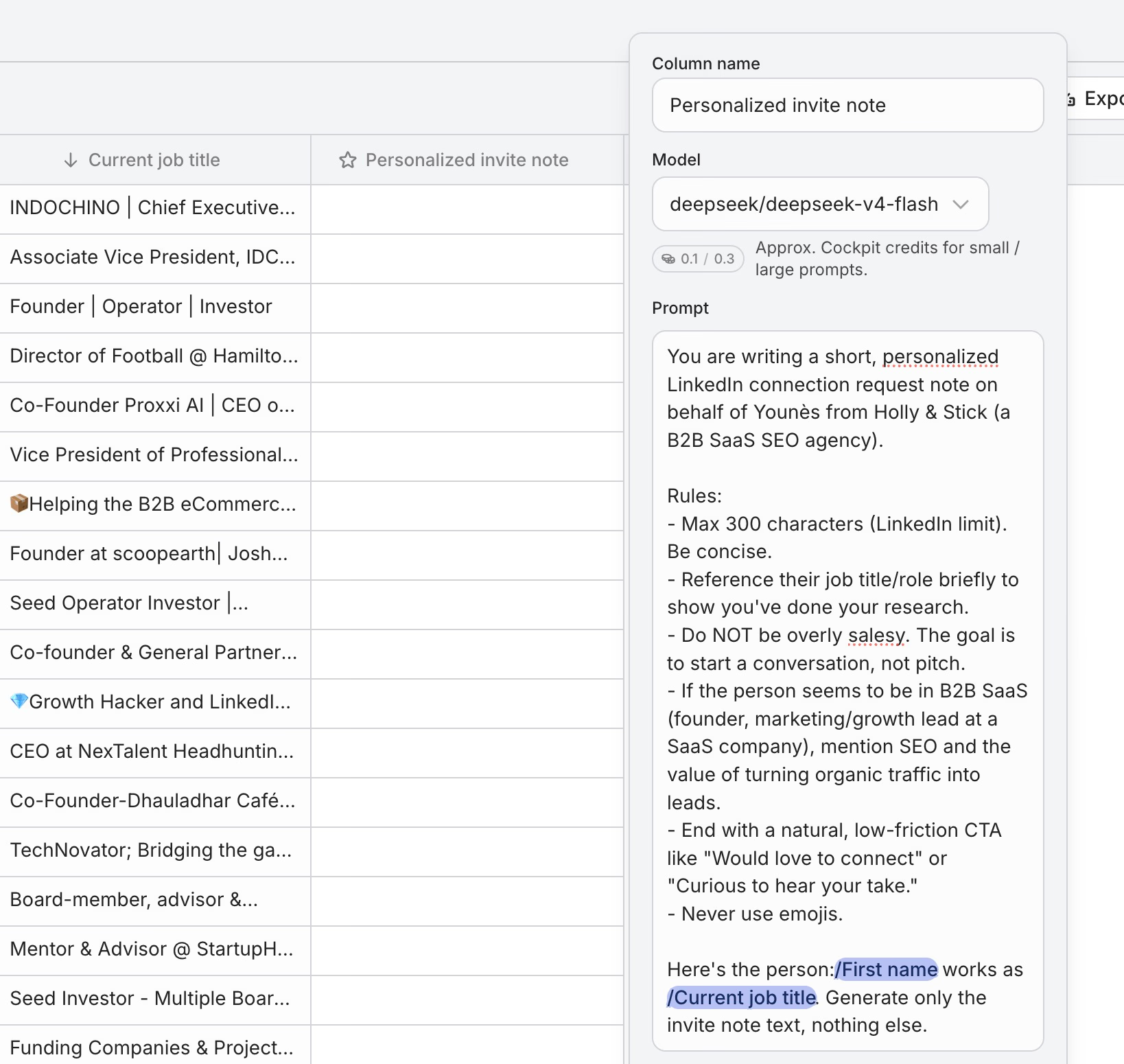
Add an AI Answer column to bridge your fresh data into a personalized hook.
For example, prompt it with:
“Write a cold email opening for {Name} at {Company}. Mention their recent funding round or, if unavailable, a recent LinkedIn post. Keep it under 25 words and conversational.”
Here’s what you might get:
“Congrats on the $12M raise, scaling with fresh capital usually means research bottlenecks get worse, especially for Salesforce-first teams like yours.”
A strong opener makes the rest of the sequence feel relevant right away.
Step 4: Build the 4-email sequence
Bring in a Sequence column and set up your drip using the frameworks from Section IV:
- Step 1: Start with your AI-generated trigger-based opener.
- Step 2: Highlight a key KPI or pain point tied to their role.
- Step 3: Add an AI-generated delegation ask.
- Step 4: Send your breakup email on Day 25.
Preview any row in the sequence canvas to keep context tight and messaging logical for each person.
This keeps every message aligned with the prospect’s situation, not a generic template.
Step 5: Export and send
Push your enriched, sequenced list straight to tools like Instantly, Lemlist, or Smartlead.
Every personalization hook and sequence timing is already mapped for each prospect.
Total time to launch: less than 2 hours.
With Cockpit’s spreadsheet model, you can stack enrichment and compound personalization, no manual effort needed.
You get consistent 15–40% reply rates by leading with context, not headcount.
Signal-based outreach is the new standard
The real edge in cold email is showing you understand what matters to each person right now. Not their name. Not their company name. But what is actually happening in their world.
The 6 buckets of personalization give you a framework to match your effort to the deal size. The 5-step workflow in Cockpit makes it repeatable at any volume. And the 4-email sequence turns that context into real conversations.
Signal-based outreach is not a trend. It is the new standard. Teams that adopt it regularly see 15-25% reply rates while everyone else chases 2%. The choice of which group you belong to starts with your next campaign.