
If people keep ignoring your LinkedIn connection requests, do not rewrite your note first. Check who you target, what your profile communicates, and whether the request gives them a credible reason to accept.
The most useful tips for increasing LinkedIn connection acceptance rates are simple: target a narrower audience, make your profile easy to trust, prioritize active members, create familiarity when it is natural, and test blank requests against genuinely relevant notes. Here is how to diagnose the weak point and improve it without chasing a universal benchmark.
What your LinkedIn connection acceptance rate actually tells you
Your LinkedIn connection acceptance rate is the percentage of sent requests that become accepted connections:
Accepted requests ÷ sent requests × 100
Measure both numbers from the same completed cohort. A request sent yesterday has not had the same chance to be accepted as one you sent three weeks ago, so comparing those cohorts can mislead you.
The rate tells you about initial trust and relevance. It does not measure replies, meetings, or revenue. A healthy acceptance rate can still produce few conversations, while a lower rate may be reasonable for a highly selective audience.
Start with segments instead of one blended number. Break the rate down by persona, market, request type, sender profile, and lead source. One overall percentage can hide the segment pulling your average down.
| Symptom | Likely cause | First check |
|---|---|---|
| Low across every segment | Broad targeting, weak profile trust, or an account-level issue | Review your profile and segment definitions |
| Low for one persona or market | Poor relevance or local context | Compare that segment’s targeting and source |
| Blank requests weak, but notes stronger—or vice versa | Request format does not fit the audience | Compare like-for-like cohorts |
| Acceptance healthy, but replies weak | Post-acceptance message or offer problem | Track replies separately |
Avoid universal benchmarks. Audiences, industries, and account contexts are not directly comparable. Fix the largest structural problem your segments reveal before polishing individual words.
7 ways to increase your LinkedIn connection acceptance rate
1. Make your profile recognizable and credible
People often check your profile before accepting. Make that review easy: use a recent, clear photo, state your role and focus in the headline, and keep your current experience accurate. LinkedIn’s own summary of connection advice (opens in a new tab) also puts profile completeness first.
Your profile should match the reason you are reaching out. A recruiter should look like a recruiter. A founder exploring partnerships should make that context visible. If your request mentions a shared industry but your profile looks unrelated or outdated, the recipient has to resolve that mismatch before deciding.
2. Narrow the audience you are targeting
A broad audience produces noisy results. Define who you actually want to meet by role, company type, use case, geography, or professional context.
“Marketing leaders” is less useful than “B2B demand-generation leaders at US SaaS companies” if that is the conversation you can genuinely support. A smaller list of people with a plausible reason to know you is easier to research and makes your acceptance-rate data more meaningful.
3. Prioritize members who are recently active
Recent posting or commenting is a useful targeting signal. Active members are more likely to see a new invitation while using LinkedIn, and their public activity gives you context for deciding whether a connection makes sense.
Activity alone does not make someone a fit. Use it as a tie-breaker after relevance: first identify people who belong in your target audience, then prioritize those whose recent activity gives you a legitimate point of connection.
4. Create familiarity before you connect
If you already have something useful to add, engage before sending the request. Comment on a specific idea, share a relevant resource, or answer a question with a concise observation.
The interaction should be real and proportionate. Do not manufacture a trail of empty comments just to appear familiar. “Great post” without substance is easy to ignore and can make the eventual request feel staged.
5. Test blank requests against genuinely personalized notes
There is no universal winner between a blank invitation and a note. Some evidence favors blank requests, while plenty of practitioner advice favors short, specific messages. Generic pseudo-personalization can perform worse than saying nothing.
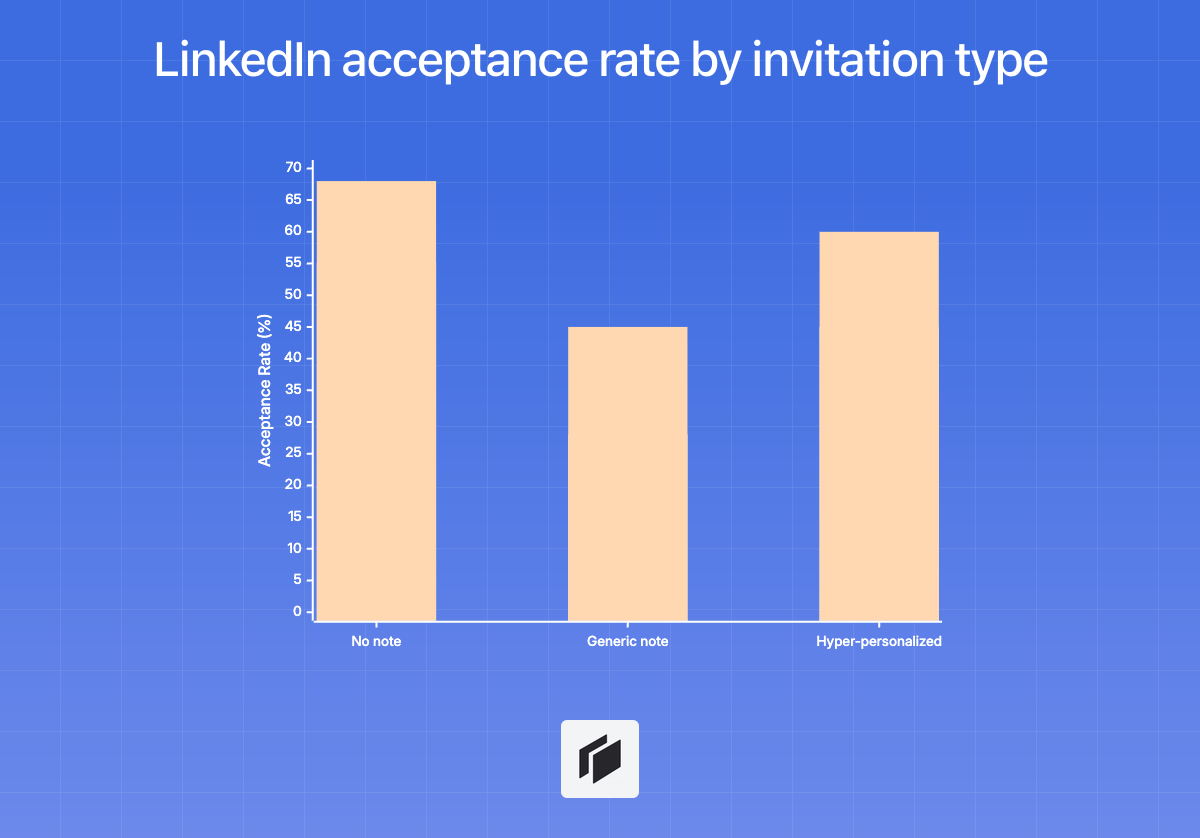
This chart visualizes the upper end of the ranges reported in ReactIn’s analysis of more than 80,000 requests (opens in a new tab) . Treat it as evidence to test, not a universal benchmark.
Test both formats with comparable audiences. If you add a note, use verifiable context: a recent post, shared project, event, or clear professional overlap—not a recycled compliment or invented familiarity. Our analysis of blank LinkedIn connection requests versus personalized notes covers the trade-off in more detail.
6. Remove the pitch
An invitation is a request to connect, not a disguised sales call, referral request, or demo booking.
Lead with the relevant connection and leave the offer for a later conversation if the person accepts. “I saw your post on onboarding analytics; I work on similar problems and would be glad to connect” is easier to evaluate than a paragraph about your product or calendar.
If you need help with the wording, adapt one of these short LinkedIn connection note examples .
7. Slow down when ignored or pending requests accumulate
A growing queue of unanswered invitations is a signal to pause and inspect your targeting, profile, and message—not to search for a secret daily limit.
LinkedIn says restrictions can follow sending many invitations quickly, accumulating many ignored or pending invitations, receiving spam reports, or using suspected prohibited automation. Its help page does not publish an exact numeric threshold. Review LinkedIn’s current invitation restrictions (opens in a new tab) , stop sending while you diagnose the pattern, and avoid automation workarounds.
Sustainable outreach comes from better-fit invitations, not from pushing through platform safeguards.
Test one change before rewriting your whole strategy
Test one variable at a time against a clear baseline while keeping the audience, timing, and follow-up process comparable. That makes the result useful without pretending a small sample proves a universal rule.
-
Build a baseline from completed cohorts. Use invitations that have had the same amount of time to be accepted. Group together comparable audiences or lead sources.
-
Choose one variable. Test the audience source, sender profile, blank versus note, or a pre-engagement step—but not several at once.
-
Hold the rest reasonably steady. Keep sample sizes similar and use the same observation window. Avoid changing your profile, targeting criteria, and request format simultaneously.
-
Read the result by segment, then check quality. Break outcomes down by persona, source, seniority, or another meaningful segment. Track replies, qualified conversations, and meetings separately so you do not optimize for connections that never become relevant interactions.
For example, send blank requests and contextual notes to comparable groups within the same narrowly defined persona. Use the same sender, lead source, and observation window. The result will not settle the blank-versus-note debate for everyone, but it can tell you what to test next for your audience.
Scale the research, not the spam
A larger list stays relevant when you expand the research layer—not the volume of invitations.
-
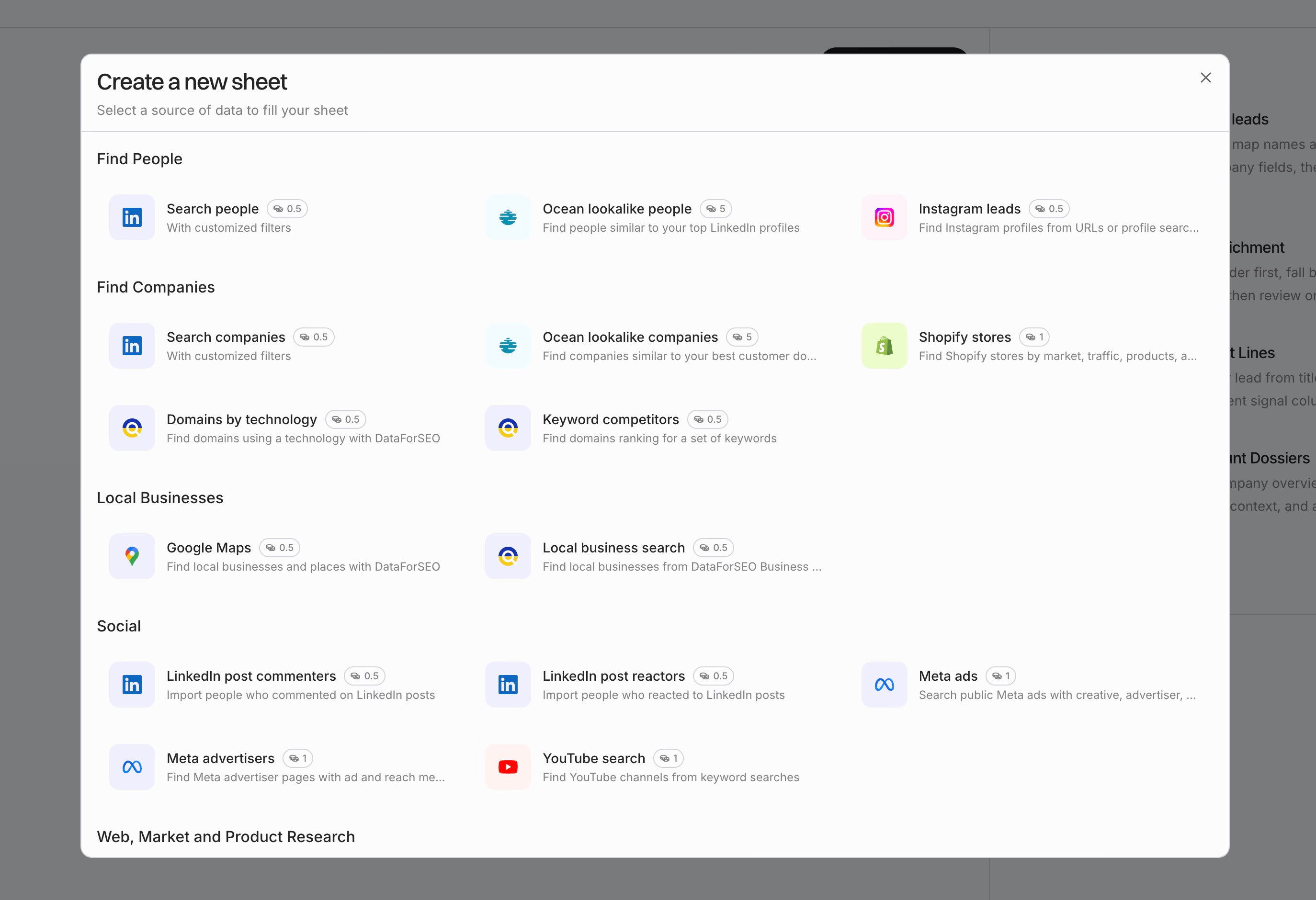
Import a targeted list from CSV, LinkedIn Sales Navigator, your CRM, or an API into Cockpit’s spreadsheet-like grid.
-
Enrich only signals that can change your decision: recent content, role and company context, hiring activity, website signals, and ICP fit. For a deeper framework, see how to use signal-based personalization at scale .
-
Segment each row before writing: blank invite, contextual note, or research further. A weak or missing signal is a reason to pause, not invent personalization.
-
Use AI to draft short copy only when a useful signal exists in the row. Review the accuracy, tone, and relevance before exporting approved rows to your CRM, sequencer, CSV, webhook, or API.
Use Cockpit to turn verified lead signals into reviewable outreach segments.