
A CRM goes out of date even when nobody touches it.
CRM data enrichment fills the missing contact and company fields in your CRM and refreshes the ones that changed, using outside data. You can use the enrichment built into your CRM, a connected tool that writes into it, or a spreadsheet round trip where you review every change before re-importing.
This guide covers what each option does in HubSpot, Salesforce, Pipedrive and Attio, which one fits a small team, and the rules that keep enrichment from overwriting what your reps entered.
What CRM data enrichment is
CRM data enrichment adds or updates fields on existing CRM records with data from external providers. Typical fields are a work email, a job title or a company’s headcount. It works on records you already have, which separates it from lead sourcing, where you look for new people.
It is one use of data enrichment , the broader job of completing any lead or customer record. The CRM version adds two constraints, no duplicates and no lost rep data. Each value must land in the right record, and it must not erase what sales reps entered.
Enrichment usually goes with cleaning, which fixes wrong values and merges duplicates. Clean first, then enrich.
Why CRM data decays
CRM data decays because people change jobs. Every job change can break an email address, a title, a phone number and the link between a contact and their company.
In January 2026, median tenure with the current employer was 4.1 years in the US, according to the Bureau of Labor Statistics employee tenure release (opens in a new tab) . One worker in five, 20.6%, had been with their employer for a year or less. Among workers aged 25 to 34, median tenure was 3.0 years.
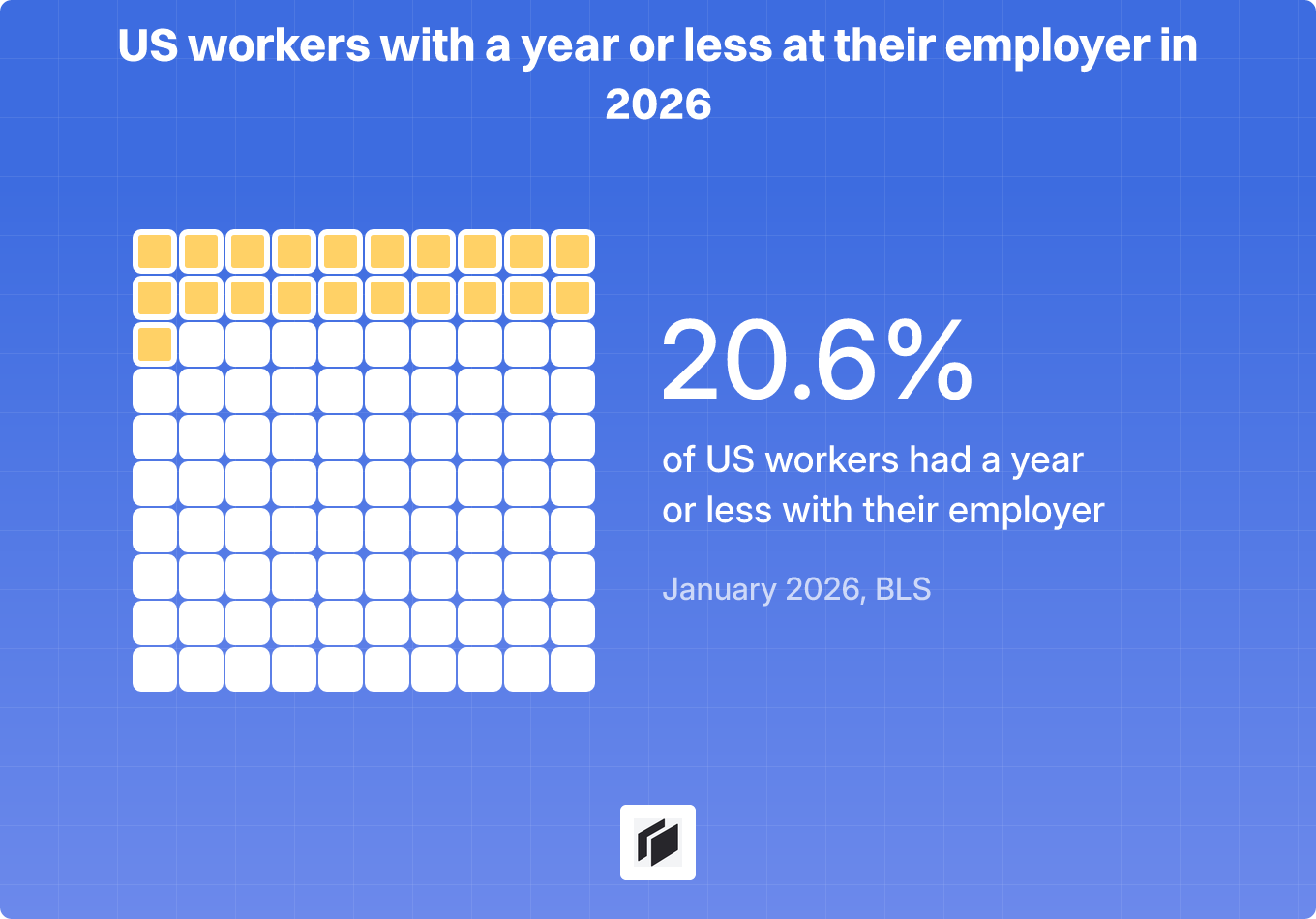
Tenure measures workers, not CRM records, so read these numbers as an order of magnitude for your contact base. Companies change too. They grow past an employee range, move headquarters, rebrand to a new domain or get acquired, and each change makes an account field wrong without anyone touching the record.
Which fields to enrich
Enrich the fields that drive routing, scoring, segmentation or outreach, and skip the rest. A field nobody filters on or writes with is pure cost.
| Record | Field | What it is used for | How fast it goes stale |
|---|---|---|---|
| Contact | Work email and verification status | Outreach, matching | Breaks at each job change |
| Contact | Mobile or direct phone | Calls, SMS | Mobiles follow the person, direct lines stay with the company |
| Contact | Job title and seniority | Routing, scoring, personalization | Changes with promotions and job moves |
| Contact | LinkedIn URL | Matching, research | Stable, the best input for later lookups |
| Contact | Current company | Account association | Breaks at each job change |
| Account | Domain | Matching, deduplication | Stable, except rebrands and acquisitions |
| Account | Industry | Segmentation | Stable |
| Account | Employee range and revenue range | Scoring, territory | Moves as the company grows |
| Account | Headquarters country | Territory, compliance | Rarely changes |
| Account | Tech stack and funding | Signals for outbound | Changes often |
Add two fields to every enriched property group, the source and the date of the last enrichment. They tell you which provider to blame for a wrong value, and which records are due for a refresh.
Three ways to enrich CRM data
The three approaches differ mostly in who controls what gets written. Native features and connected tools write on rules you set once, while a spreadsheet round trip lets you check each batch.
| Approach | Examples | Best for | Control over overwrites |
|---|---|---|---|
| Native enrichment | HubSpot, Pipedrive, Attio | Firmographics on new records | Limited to the CRM’s settings |
| Connected tool that writes back | ZoomInfo, Apollo, Clay | High volume, scheduled refreshes | Per field, set once in the mapping |
| Spreadsheet round trip | Any enrichment tool plus a CSV update | Small teams, batch enrichment | Total, you review before import |
1. Native CRM enrichment
Native enrichment is the cheapest start, because it is included in or sold with the CRM. It is strongest on company data, and only Pipedrive finds emails and phones natively.
HubSpot includes data enrichment in all paid plans of its Smart CRM at no extra cost, according to HubSpot (opens in a new tab) . It does not consume HubSpot Credits, as its getting started guide (opens in a new tab) states, and some of HubSpot’s help pages still call it Breeze Intelligence. It adds fields such as job title, industry and company size, matching contacts on name and work email and companies on domain.
Records with a Gmail, Yahoo or other free address cannot be enriched (opens in a new tab) , and the same page lists the Starter, Professional or Enterprise subscription it requires. In its settings (opens in a new tab) , you can enrich new records automatically, refresh enriched records monthly, set an overwrite rule per property and revert changes from an activity log.
Check one detail before you turn it on. When HubSpot verifies a record, it may add the first name, last name and business email to its own commercial dataset, as its enrichment documentation (opens in a new tab) explains.
Salesforce no longer has a contact database to enrich from. It removed all contact data from Data.com (opens in a new tab) on February 1, 2021, so Salesforce teams rely on connected tools such as ZoomInfo or Apollo, or on the spreadsheet method.
Pipedrive offers data enrichment (opens in a new tab) powered by Surfe on its Premium, Ultimate and Enterprise plans. Premium covers organizations only, and enriching people needs an add-on. Each organization costs 1 credit, each email 2 and each phone 5, only empty fields are filled, and a bulk run handles up to 100 records.
Attio enriches people and companies on all plans (opens in a new tab) from an email address or a domain. Companies get a description, categories, location, estimated ARR, employee range and funding raised. People get a job title, company and location, but no email or phone.
Attio’s help center also states that enriched data can’t be exported, so it stays inside Attio.
Native enrichment is the right default for firmographics on new inbound records. Outside Pipedrive, work emails and mobiles need a dedicated provider. Our phone number enrichment guide compares them by region.
2. Connected enrichment tools that write to the CRM
Connected tools sync with your CRM and write enriched values into its fields, on creation or on a schedule. They cover more data than native features, and a bad mapping spreads to every record they touch.
ZoomInfo sells Enrich as a feature of ZoomInfo Sales, for Salesforce (opens in a new tab) and HubSpot (opens in a new tab) . In Salesforce, Instant Enrich fills records as they are created and Scheduled Enrich runs regular refresh jobs. ZoomInfo’s guide recommends “Complete if missing” for every standard field and “Overwrite” only for custom fields created for ZoomInfo, which is good advice for any tool.
Apollo’s CRM enrichment (opens in a new tab) connects to Salesforce and HubSpot. You can enrich up to 1,000 records at a time by hand, enrich records in real time as they sync, or schedule weekly or monthly jobs. Each field is set to auto-fill, which writes only when the CRM field is empty, or to overwrite.
Apollo’s free plans can enrich 100 CRM records every 30 days, enough to test the mapping before you pay. For other tools, see these Apollo alternatives for data enrichment .
Clay’s HubSpot integration (opens in a new tab) imports HubSpot objects into a Clay table, then creates or updates HubSpot records from it, with conditions on when each step runs. You build the enrichment yourself from Clay’s providers, which gives you the most control and the steepest setup. Our Clay pricing breakdown covers what that costs.
Pick a connected tool when enrichment is a continuous job on thousands of records and one person owns the field mapping. Without that owner, the overwrite settings drift and nobody notices until reps complain.
3. Spreadsheet round trip
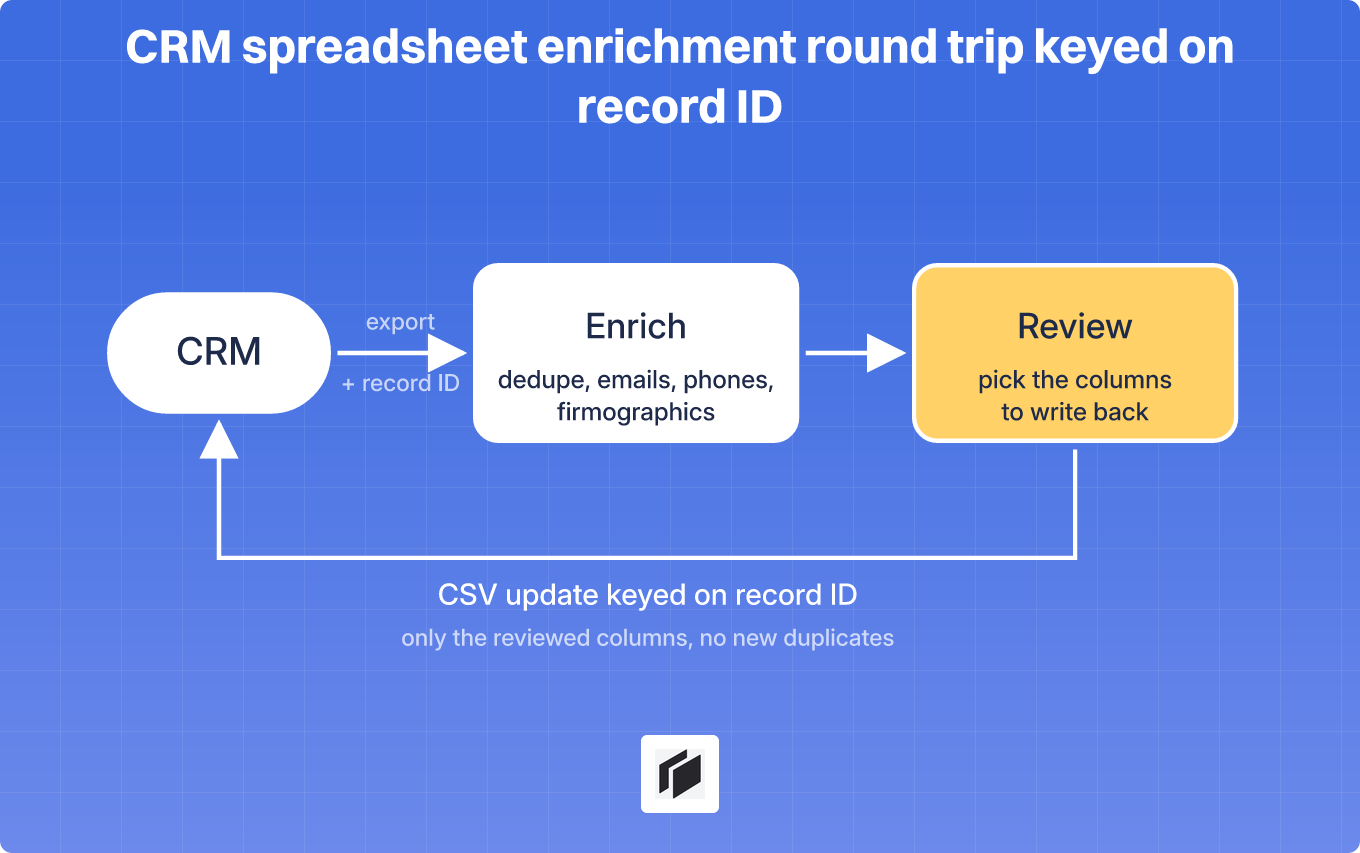
The spreadsheet round trip takes records out of the CRM, enriches them in a sheet, and brings them back with a CSV update. It is slower than a sync, and it is the only method where a human sees every change before it lands in the CRM.
- Pull the records with their record ID. Export them from the CRM, or import them into your enrichment tool through its CRM connection. Filter to the segment you need, such as contacts updated before a date or companies owned by one rep, and keep the record ID column.
- Dedupe and fix the inputs. Remove duplicates and fix broken domains before any lookup runs.
- Enrich. Add columns for the fields you need, using a waterfall for emails and phones.
- Review. Filter on empty results, low-confidence matches and values that differ from the CRM. Decide which column replaces which field.
- Re-import as an update. Upload a CSV keyed on the record ID, with only the columns you decided to write.
Each CRM documents its own update import:
- HubSpot needs a unique identifier (opens in a new tab) to update records, such as Record ID, email or company domain name. Blank cells are ignored and don’t clear existing values, which protects you from wiping fields by accident.
- Pipedrive updates records in bulk when you map its System ID columns (opens in a new tab) on import, with a limit of 50,000 rows and 50 MB per file.
- Salesforce updates existing accounts and contacts with its Data Import Wizard when you match by Salesforce ID (opens in a new tab) .
- Attio matches on a unique attribute (opens in a new tab) , which is the email for people, the domain for companies, or the Record ID. Without one, it creates duplicates. Keep new records out of a Record ID file, because they won’t import.
This is the approach we recommend for small teams. You enrich a segment before a campaign, pay only for those records, and keep a file that shows exactly what changed.
CRM data enrichment best practices
Each rule below holds for native features, connected tools and spreadsheets alike.
Dedupe before you enrich
Merge duplicates first. Two records for the same person get enriched twice, cost twice, and can end up with two different job titles. In a spreadsheet, a sort on email or domain finds most of them.
Use one match key per object
The match key decides which record receives which value. For updates, use the CRM record ID, because it never changes and never collides. When you have no ID, use the email for contacts and the domain for companies.
Lookups need a different input. A LinkedIn URL, or a name plus a company domain, finds a person far more reliably than a name alone. Fill those columns before you run anything.
Never overwrite owner-entered data
Owner-entered data beats a value a provider found. Reps hear things on calls that no database knows, such as a new title before the LinkedIn update, or a direct line. Overwriting that destroys the most accurate information in your CRM.
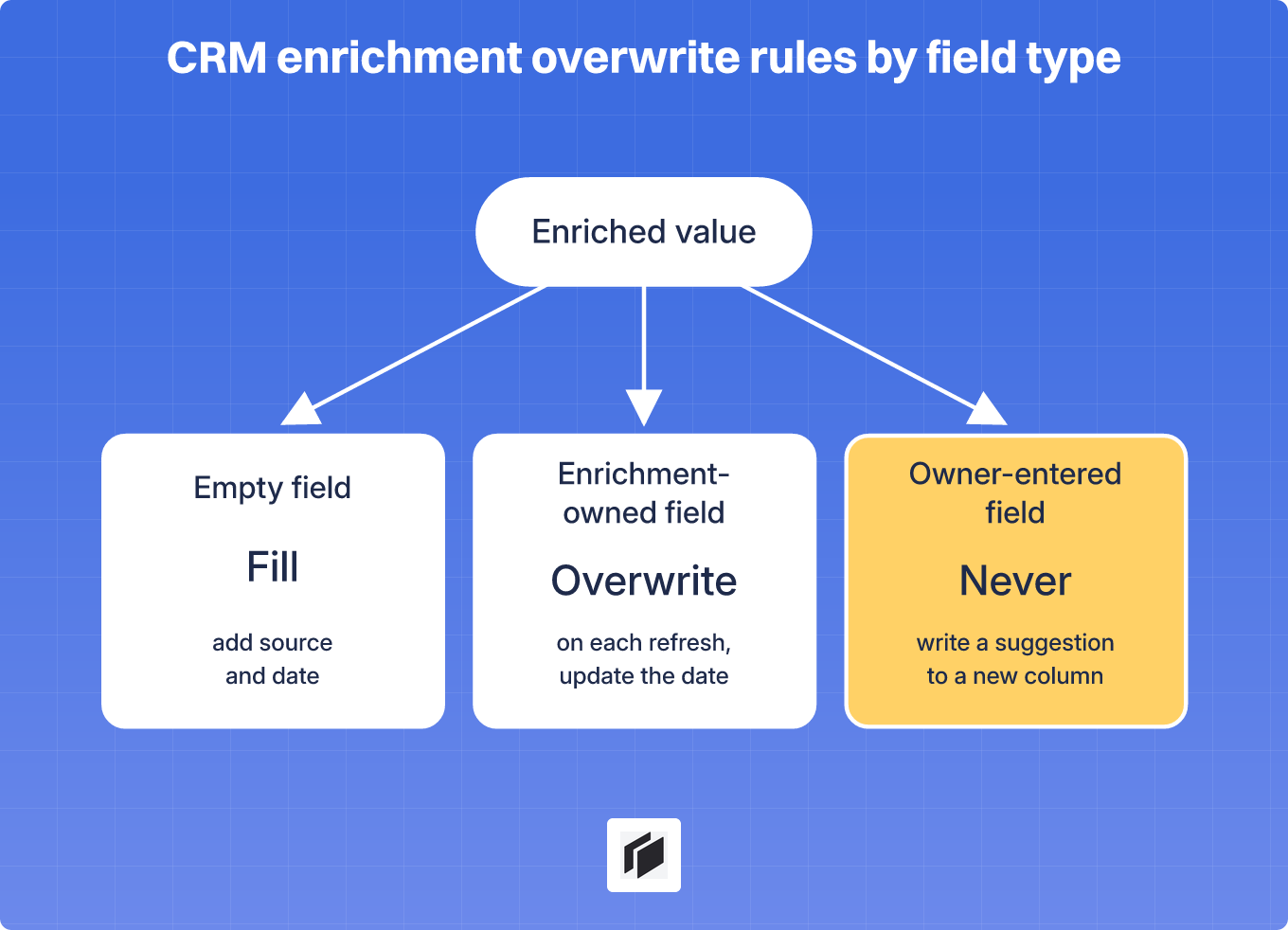
Sort every enriched field into one of three groups, and give each one a rule:
- Empty fields. Fill them.
- Enrichment-owned fields. Overwrite them on refresh. These are fields only enrichment writes to, such as employee range, ideally in properties created for that purpose.
- Owner-entered fields. Never overwrite. Write the new value to a separate column, such as “Suggested job title”, and let the owner decide.
HubSpot’s option to overwrite incorrect enriched values follows the same logic, since it never touches values set manually, by workflows or by integrations. Its workflow enrichment action, however, can overwrite regardless of your rules.
Map fields before the first run
Enrichment values must fit the CRM’s field types. Dropdowns are the usual trap. HubSpot’s custom industry property, for example, only accepts enriched values when the option labels and internal names match exactly.
Write the mapping down before the first run, with the provider field, CRM property, format and overwrite rule for each line. Agree on one format for employee ranges, country names and phone numbers, or segment filters will silently miss records.
Set a refresh cadence
Refresh by how fast a field decays and how much it is worth. Our recommendation for small teams:
- Contacts in open deals or active sequences: check emails and titles every quarter.
- Accounts you target: refresh firmographics twice a year.
- Dormant records: enrich them only when they come back into a campaign.
- Any list you are about to email: re-verify the addresses right before the send, whatever their age.
Enrich on create or in batches
Enrich on create when a decision depends on the data within minutes. Inbound form leads are the typical case, since routing and scoring need company size and industry before a rep picks the lead up.
Enrich in batches for everything else, such as outbound segments, old records and imported lists. Batches let you review results, control the cost, and skip records you will never contact.
Respect consent and GDPR
Enrichment processes personal data, so under the GDPR you need a legal basis for it. Pipedrive’s documentation reminds users that they remain the data controller, responsible for the legal basis, for informing people and for opt-outs.
When the data does not come from the person, Article 14 of the GDPR (opens in a new tab) requires you to inform them within a reasonable period and at the latest within a month, or at your first message if you contact them. That information includes the source of the data, which your source column already records.
Honor opt-outs everywhere. HubSpot, for instance, adds an “enrichment opt out” label to contacts who asked to leave its dataset, so filter them out before each run. Have your legal basis reviewed once by counsel, then apply it to every batch.
Enriching CRM records with Cockpit
Cockpit is a spreadsheet for lead enrichment, so it fits the third method. It imports records from your CRM, enriches them in a grid where you review every value, and exports a file for re-import. It does not write back to your CRM directly.
- Import. Connect HubSpot (contacts and companies), Pipedrive (persons and organizations) or Attio (people and companies). Filter by search, owner, status or records updated since a date, and import up to 10,000 records at a time. Each row keeps its CRM record ID.
- Enrich. Find work emails with Icypeas on Cockpit credits. On the Growth plan and above, connect your own Apollo, Hunter or Prospeo key and chain them in an email waterfall. Verify the emails with MillionVerifier on Cockpit credits. For phone numbers, plug your own Apollo or Pipecorn key into a phone column or a phone waterfall. Pull company size, industry, locations and funding from LinkedIn company pages, or add AI columns that research each company on the web.
- Review. Filter on missing values and compare enriched columns with the CRM values before anything leaves the sheet.
- Export. Download a CSV with the record ID and the columns you want to update, then re-import it in your CRM. You can also send contacts to Lemlist or Instantly on the Growth plan and above.
Credits are charged only when a provider finds a value. Plans start at $29 for 3,000 credits, with a 14-day trial. The contact record enrichment use case shows the contact workflow step by step, and the firmographics verification use case does the same for company fields.
CRM data enrichment checklist
Run through this list before each enrichment batch:
- Duplicates merged on email for contacts and domain for companies
- Record ID exported with every row
- Inputs fixed: valid domains, LinkedIn URLs filled where possible
- Fields to enrich chosen for a reason: routing, scoring, segmentation or outreach
- Field mapping written down: provider field, CRM property, format, overwrite rule
- Owner-entered fields protected, suggestions written to separate columns
- Source and enrichment date columns added
- Emails verified and catch-all addresses flagged
- Sample of 50 rows checked by hand before the full run
- Re-import file keyed on the record ID, with only the columns you decided to update
- Legal basis documented and Article 14 notice planned for EU and UK contacts
- Next refresh date set
On HubSpot, Pipedrive or Attio with fewer than a few thousand records, turn on native enrichment for company data and use a spreadsheet round trip for emails and phones. On Salesforce, start with the round trip. Move to a connected tool once enrichment becomes a weekly job.
FAQ
What is CRM enrichment?
CRM enrichment is another name for CRM data enrichment. It uses external providers to add missing fields to your CRM contacts and companies, such as emails, phones, titles and company size. It also refreshes the fields that changed.
Are there trusted platforms for automatic CRM account enrichment?
Yes. HubSpot and Attio enrich company records automatically from the domain, Apollo runs real-time and scheduled jobs on Salesforce and HubSpot, and ZoomInfo does the same on Salesforce. Trust a platform that logs each change, lets you set overwrite rules per field and shows where each value came from.
How do I enrich HubSpot contacts?
On a paid plan, turn on HubSpot’s data enrichment to add job titles, industry and company size to contacts with a work email. For emails and phones, connect Apollo or ZoomInfo. You can also export the contacts with their Record ID, enrich them in a spreadsheet and re-import the file as an update.
Can AI enrich CRM data?
Yes, for fields no database sells, such as a company’s pricing model, whether it sells to enterprises, or a summary of its latest news. An AI workflow for lead enrichment researches each record on the web and writes the answer to a column. Ask it to return the source URL, and check a sample before you import, because AI can state wrong facts with confidence.
How do I enrich customer lists for personalization?
Enrich the fields your messages will use, such as job title, company size, tech stack or a recent company event, then write the copy from those columns. Our guide on personalizing cold emails at scale shows how to turn enriched fields into relevant emails.
How often should you enrich CRM data?
Quarterly for contacts in active deals and sequences, twice a year for target accounts, and right before any send for email verification. Dormant records only need enrichment when they come back into a campaign.