
Data enrichment is the process of adding missing information to records you already have, such as a work email, a job title or a company’s size. It works by matching each record against outside sources, so a thin list goes in and a list you can segment and contact comes out.
Most of the work is in the details. A record has to match the right person, each field has a price, and the data starts aging the day you get it.
For outbound, two things decide whether enrichment pays off: the identifier you start from and the fields you choose to pay for. Both are covered below, with B2B sales and marketing in mind.
What data enrichment means
Enrichment adds fields you don’t have. Cleansing fixes the fields you do have, for example by removing duplicates or correcting formats. A perfectly clean list of 500 names with no emails is still useless for outbound.
The benefit is that every later step gets easier. You can filter a list on company size, write to a verified address, and open with something true about the lead. The same job is also called “data appending”.
Enrichment can use your own data, such as product usage joined to a CRM record. In B2B sales and marketing, though, the term usually means third-party enrichment. Each record goes to data providers, the public web or an AI agent, and their answers are written back into it.
E-commerce teams use the same term for product data, adding descriptions, specs and images to a catalog. B2C marketers also enrich with demographics such as age or income. Both are different jobs, and this guide sticks to B2B.
B2B data enrichment works on two kinds of records: people and companies. Every field you add belongs to one or the other, and that split decides which providers can fill it.
Data enrichment examples: one lead before and after
Here is a single lead from a LinkedIn people search, before and after enrichment. The person and the company are made up. The fields are the ones a typical outbound workflow adds.
| Field | Before | After | Type |
|---|---|---|---|
| Name | Sarah Klein | Sarah Klein | Input |
| Job title | Head of Revenue Operations | Same | Input |
| Company | Northline Freight | Northline Freight | Input |
| LinkedIn URL | linkedin.com/in/sarahklein | Same | Input, used as the match key |
| Work email | Empty | sarah.klein@northlinefreight.com , verified | Contact |
| Mobile number | Empty | Not found | Contact |
| Company domain | Empty | northlinefreight.com | Firmographic |
| Headcount | Empty | 51 to 200 | Firmographic |
| Industry and HQ | Empty | Logistics, Rotterdam | Firmographic |
| Tools on the website | Empty | HubSpot | Technographic |
| Recent signal | Empty | Two open SDR roles | Signal |
| Research note | Empty | Expanding sales into Germany, according to its careers page | AI web research |
The LinkedIn URL did most of the work here, because it points to one person without ambiguity. The empty mobile is normal. The last three fields don’t make Sarah easier to reach, but they give you a reason to write to her this month.
Three other common examples:
- Account list. A company domain goes in. Headcount, industry, location, tools and signals come out.
- Inbound form. A sign-up form asks only for a work email. Enrichment adds the company and role, so the lead can be scored and routed without a longer form.
- CRM refresh. Old contacts get a new verification status, and the ones who changed company get flagged.
Types of data enrichment
Five types cover almost every B2B use. They differ in what they tell you and in how fast they go stale.
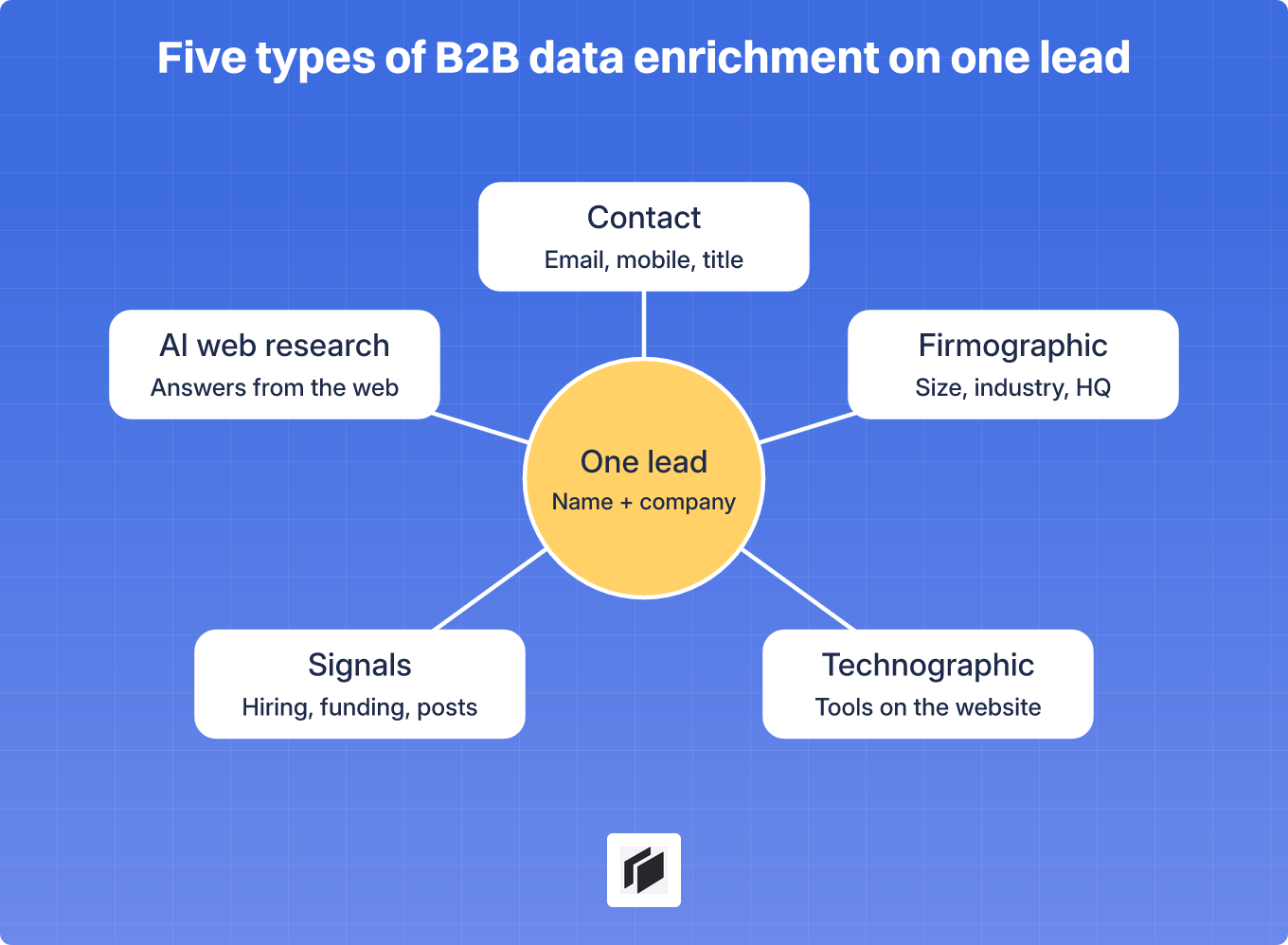
| Type | Record | Typical fields | What it’s for | How fast it goes stale |
|---|---|---|---|---|
| Contact | Person | Work email, personal email, mobile number | Reaching the person | Months, as people change jobs |
| Firmographic | Company | Domain, headcount, industry, location, funding stage | ICP fit and segments | Years |
| Technographic | Company | Tools detected on the company website | Qualifying on the tools they use | Months to years |
| Signals | Both | Job posts, a new funding round, new executives, post engagement | Timing | Weeks |
| AI web research | Both | Any answer a person could find on the web | Personalization and custom qualification | Depends on the question |
Contact enrichment
Contact enrichment finds the fields that let you reach a person, the work email first and the phone number second. Work emails have the widest coverage and the lowest price. Mobile numbers are harder to find and cost several times more, so our phone number enrichment guide covers when they are worth paying for.
The contact records use case shows a full setup.
Firmographic enrichment
Firmographics describe the company: headcount, industry, location, revenue range and funding stage. They come from the company domain and change slowly. Use them to score ICP fit and to split a list into segments before you write a single email.
Sources often disagree here. LinkedIn headcount, a database’s employee range and a public filing can give three different numbers. Pick one source per field and stick to it, or your segments will move every time you re-run. The firmographics use case shows one way to check them.
Technographic enrichment
Technographics list the tools a company runs, detected from the code on its website. They answer “do they use X?”, the strongest qualifier when your product plugs into a tool or replaces one. Detection only sees what the public site loads, so internal tools such as an ERP rarely show up. See the website signals use case for an example.
Signals
Signals are events, such as a job post, a funding round, a new executive, a comment on a LinkedIn post or a visit to your pricing page. A signal tells you when to write. Firmographics already told you whether the company fits.
Third-party intent data, which tries to infer what topics a company is researching, is a separate product sold by specialist vendors. Most small teams get more from public signals they can explain in one line of an email.
AI web research
AI web research sends an agent to the web with one question per row. “Does this company sell to hospitals?” or “Do they offer a free trial?” are typical. AI research fills the fields no database stores, and those fields are what make a message specific.
Treat each answer as a draft. Ask the agent to return its source URL in the output, and check a sample before anything is sent. The AI research columns use case walks through the setup.
Where enrichment data comes from
Enrichment data comes from four kinds of sources, and each trades coverage against freshness.
- Data providers. Databases such as Apollo and ZoomInfo, email finders such as Icypeas, and services such as FullEnrich that query several providers in turn. They match your record against data collected beforehand, so answers are instant, but only as fresh as the last refresh.
- The public web and registries. Company websites, job boards, press releases and public company registers. The data is free and current, but slow to read by hand.
- Scraping. Pulling structured data from a page, such as a LinkedIn profile, a Google Maps listing or a site’s tech stack. The data is fresh at the time of the run, priced per page or row, and bound by each site’s terms.
- AI agents. A language model that searches and reads pages to answer a question. It is the most flexible source, slower than a database lookup, and only as good as the prompt and the pages it finds.
Your own first-party data, such as form fields, product usage and CRM history, is the most reliable source for what it covers. It rarely helps with outbound, because people you haven’t talked to yet aren’t in it.
For outbound, use providers for contact fields and AI agents for anything that needs judgment. That split keeps costs low and keeps a language model away from email addresses, which it would have to guess.
How the data enrichment process works
Whatever the tool, the data enrichment process runs the same five steps.
- Pick the match keys. These are the identifiers you send: a LinkedIn URL, an email, a company domain, or a name with a company.
- Match. The provider looks for one person or company that fits those keys, and returns a result or nothing.
- Fall back. If nothing comes back, the record goes to the next provider.
- Verify. Emails go through a deliverability check, and weak matches get a human look.
- Write back and refresh. Results go into your sheet or CRM, and get re-run when they go stale.
Match keys and confidence
The key you send decides how sure the match is. A LinkedIn profile URL or a work email points to one person. A name with a company domain pins down the company but not always the person.
A name with a company name is the weakest key. Two people can share a name, and “Northline” can be three different companies.
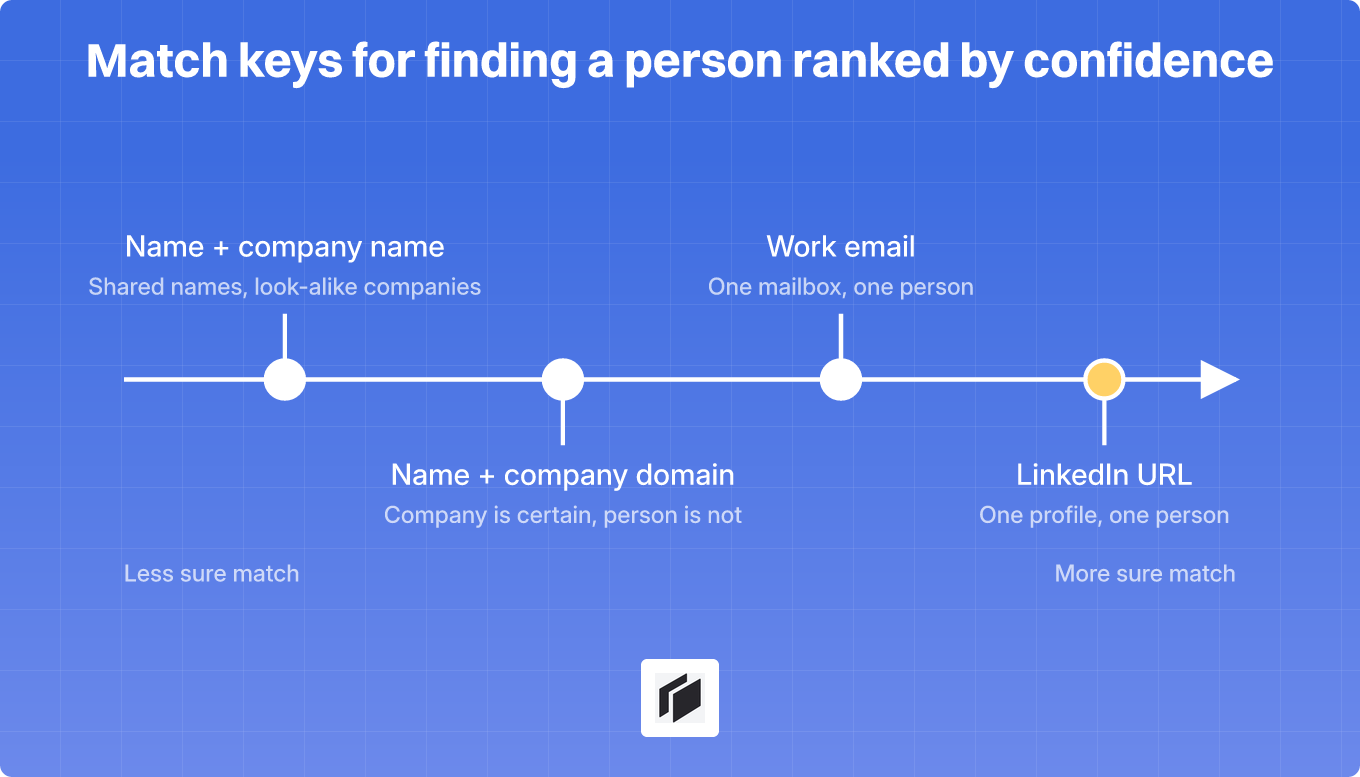
A weak key fails in two ways. Either nothing is found, or the wrong person is found, which costs you a bounce or an awkward email. Find the company domain first, then look for the person at that domain.
When a provider returns a confidence score or status, keep it in its own column. Then review the low ones by hand before they reach a sequence.
Waterfalls
No provider covers everyone. A waterfall calls several providers in order and stops at the first answer. Put the cheap and accurate provider first and the expensive one last, so the premium price only applies to leads nobody else found. Our waterfall enrichment guide shows how to order providers and what each one costs.
Verification and write-back
A found email is only a candidate until a verifier confirms the mailbox accepts mail. Bounces hurt your sending domain, so keep the verification status as its own column and send only valid addresses to the sequencer.
Store the source and the date next to each enriched field too. Without them, you can’t tell which values are stale or which provider got it wrong, and you can’t tell a prospect where you found their details.
Data enrichment use cases in sales, marketing and CRM hygiene
Sales: from a name to a qualified lead you can reach
Sales teams use enrichment to reach the right person and to know why to write now. A typical outbound list starts from a LinkedIn search or a list of target accounts. It gets verified emails, is filtered on firmographics, then gets one or two signals or research fields for the opening line.
Marketing and audience enrichment
Marketing data enrichment starts from people who already gave you an email. That email is often personal, and it comes with little else. Enrichment adds the company and the role, so marketing can tell a student from a buyer before it spends on nurturing.
Audience enrichment, for most teams, hits one obstacle first. A Gmail address carries no company domain, so providers have nothing to match on and find rates drop. Reverse email lookup finds the person and company behind an email, and it is the field to add when your list is mostly personal addresses.
Once the company is known, the audience can be split by size or industry and sent to different tracks. For example, a SaaS team can enrich its newsletter list with company size and industry, then send one nurture track to startups under 50 people and another to mid-market companies. The same segments can feed ad audiences and account-based campaigns.
CRM hygiene
A CRM fills up with records that have a name and nothing else, duplicates from old imports, and contacts who left their company. Enrichment fills the gaps and shows who moved, while cleansing merges the duplicates.
Clean the records you are about to use first, before a campaign or a change in lead scoring. Our CRM data enrichment guide goes through it step by step.
Data decay: why enriched data has a shelf life
Enriched data starts aging the day you get it. People change jobs and email addresses stop working. ZoomInfo estimates (opens in a new tab) that contact data decays at roughly 30% per year, and that is a vendor’s figure for its own database.
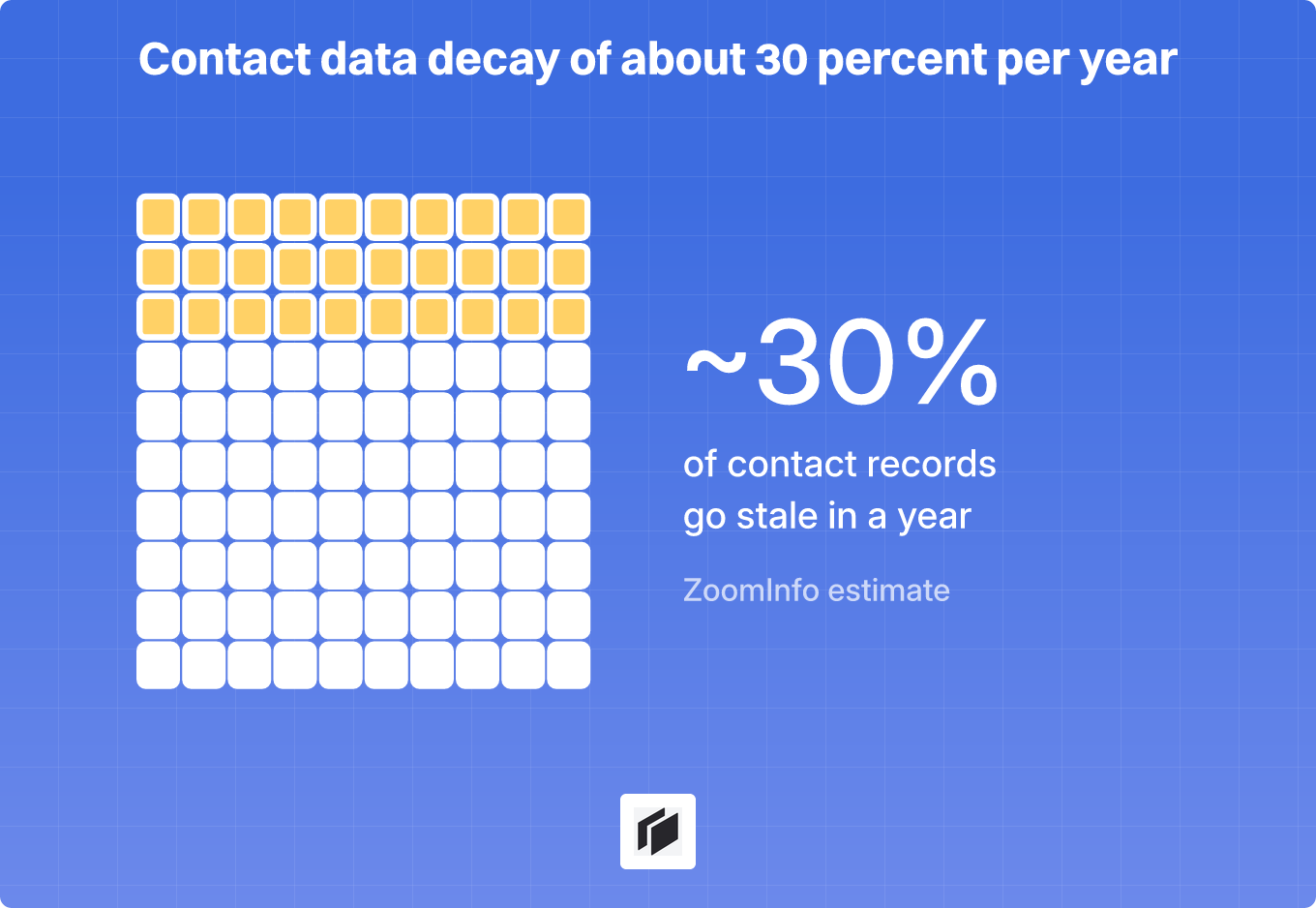
Re-enrich contact fields right before you use them, not on a yearly cycle. Signals need it most, since they expire within weeks. If a list sat for three months, re-verify the emails before sending.
Is data enrichment legal? GDPR and opt-out basics
Under GDPR and US email law, enriching business contacts is allowed when you have a lawful basis, are open about the source and honor opt-outs. This is a short summary, not legal advice.
- Lawful basis. Under GDPR, B2B prospecting usually relies on legitimate interest. Recital 47 (opens in a new tab) says direct marketing “may be regarded as carried out for a legitimate interest”, but you still have to weigh it against what the person would reasonably expect.
- Information. When the data did not come from the person, Article 14 (opens in a new tab) requires you to tell them who you are, why you have their data and where it came from. You must do it within a reasonable period and at the latest one month, or in your first message if you write earlier.
- Opt-out. Article 21 (opens in a new tab) gives people the right to object to direct marketing at any time, and you have to stop once they do. In the US, the CAN-SPAM Act (opens in a new tab) makes no exception for B2B email. Every message needs a clear opt-out, honored within 10 business days.
Keep a suppression list that every enrichment and export checks. Add a short line on where you found the person’s details to your first email, along with the opt-out. National email rules can add to GDPR, so check the rules in your prospects’ country.
What data enrichment costs
Contact data is usually billed per result, so the number that matters is the price per field found. The figures below come from vendor pricing pages and our own comparisons, checked in November 2026.
| Field | Typical cost | Detail |
|---|---|---|
| Work email | Half a cent to about $0.09 per found email, about $0.04 in Cockpit (4 credits) | Lead enrichment tools |
| Work email through a waterfall | $15 to $75 per 1,000 found emails | Waterfall enrichment |
| Mobile number | About $0.49 to $0.75 at BetterContact, 10 times an email’s credits at FullEnrich | Phone number enrichment |
| Email verification | About $0.01 in Cockpit (1 credit) | Waterfall email enrichment |
| LinkedIn profile or company page | About half a cent in Cockpit (0.5 credit) | Contact records |
| Website technologies | About $0.04 in Cockpit (4 credits) | Website signals |
| AI column per row | From a tenth of a cent to about $0.13 in Cockpit, depending on the model and text length | AI research columns |
Cockpit figures use the entry plan, where one credit costs just under one cent. Some tools add a subscription on top. Clay starts at $185 a month billed monthly, as our Clay enrichment guide details, and Apollo at $49 per user per month billed yearly.
The biggest cost is enriching rows you never contact. Filter on firmographics first, because they are cheap. Then find emails only for the leads that fit, and phones only for the people you will call.
How to choose a data enrichment tool
Start from the fields you need and your volume. Data enrichment tools fall into four groups.
| Kind of tool | Examples | Best for | Watch out for |
|---|---|---|---|
| Database with prospecting | Apollo, ZoomInfo | Finding and enriching leads in one place | One dataset, so its gaps stay gaps |
| Email finders | Icypeas, Prospeo | Cheap work emails | One type of field |
| Waterfall services | FullEnrich, BetterContact | High find rates on emails and mobiles | Little control over which providers run |
| Workbenches | Clay, Airscale, Cockpit | Combining providers, scraping and AI in one sheet | Someone has to build the workflow |
Then check five things before you pay:
- Billing on results. A tool that charges for misses makes a low find rate expensive.
- Find rate on your own list. Run a sample of your leads through it, because vendors measure find rates on their own data.
- The inputs it accepts. If you have LinkedIn URLs, check that the tool matches on them.
- Where the data goes next. A native export to your sequencer saves a CSV round trip.
- Who runs it. A workbench needs someone to set up columns, while a service needs nobody.
For a founder or a team of one to three, a workbench with a waterfall is the best default. A database makes sense when you also want its built-in sequencer, and our Apollo alternatives cover that side. For tool-by-tool reviews, see the B2B data enrichment tools comparison and our lead enrichment tools ranked by cost per email.
Where Cockpit fits
Cockpit is a spreadsheet for lead enrichment, built for founders and small teams. You import leads from a CSV, a LinkedIn people or company search, or the reactors and commenters of LinkedIn posts. Other sources are HubSpot, Pipedrive and Attio, Google Maps, lookalike companies and people, companies by the technology they use, and Shopify stores.
Then you add one column per field:
- Emails. Icypeas finds work emails on Cockpit credits, and MillionVerifier verifies them. You can add Hunter, Prospeo, Apollo and other finders with your own API key and chain them in a waterfall.
- Phones. Plug your Apollo or Pipecorn key into a phone column or a phone waterfall. Cockpit doesn’t sell mobile numbers on its own credits.
- Company data. LinkedIn profiles and company pages, and the technologies a website runs.
- AI. AI columns and an AI web research agent write their answers into the sheet.
Credits are only charged when a value is found. Plans cost $29 a month for 3,000 credits, $79 for 10,000 and $199 for 30,000, with a 14-day trial. Saved provider keys come with the Growth and Scale plans, at 1 credit per successful call. You can export to CSV, Lemlist or Instantly, and sequence export also starts on Growth.
Cockpit has limits. It has no database of its own, so coverage is that of its providers, and it doesn’t sell third-party intent data. It imports from your CRM but doesn’t write enriched data back to it.
If you want a CRM that enriches itself continuously, look elsewhere. Cockpit fits when you want to turn a list into enriched, personalized outreach on a small budget. A found and verified email costs 5 credits, roughly $0.05 on the entry plan.
Where to start
Take 100 leads you plan to contact this month. Enrich three fields: a verified work email, one firmographic field to filter on, and one signal or research field for the opening line. Count what was found, what was wrong and what it cost, then decide which fields earn a place on the full list.
FAQ
What is a data enrichment tool?
It is software that matches your records against outside sources and adds the missing fields. Some run in batches on a list you upload, while others enrich each new record the moment it reaches your CRM or form.
Can AI be used for data enrichment?
Yes, for questions about a company, such as what it sells, who it sells to or what it recently announced. An agent reads the web for each row and writes its answer into a column. Emails and phone numbers should come from finders and verifiers instead.
What does a data enrichment specialist do?
A data enrichment specialist, often called a GTM engineer or data operations lead, builds and runs enrichment workflows. That means picking providers and their order, writing AI prompts and checking samples. In a small team, the founder or the first SDR usually does it.
Can you enrich data for free?
Only for small volumes. FullEnrich (opens in a new tab) gives 50 free credits without a credit card, and Cockpit’s 14-day trial includes 500 credits. Manual research on company websites and LinkedIn costs nothing but time.